Sender reputation controls deliverability more than spam words. Fix authentication, list quality, and infrastructure first—then refine copy as a final cleanup layer.
- Sender reputation affects all campaigns while spam words impact individual templates
- SPF, DKIM, and DMARC authentication must be correct before copy matters
- Bad list data creates bounces and complaints that damage trust faster than wording
- Shared warmup pools let other senders hurt your reputation even with clean emails
- Plain, honest copy works best after infrastructure and list hygiene are solid
- Fix authentication and list quality first, then revise subject lines and body copy
Spam Words vs Sender Reputation: What Matters
If your emails miss the inbox, sender reputation is usually the main reason - not a few “spam words.”
From what I see, the order is simple: fix SPF, DKIM, and DMARC, clean your list, avoid shared warmup pools, and only then edit copy. A weak setup can hurt every campaign, while copy issues often hurt just one subject line or one template.
Here’s the short version:
- Sender reputation has more weight than word choice
- Bad list data can hurt inbox placement fast through bounces and complaints
- Shared infrastructure can damage delivery even if your own emails look fine
- Spammy wording still matters, but it is usually a second-layer issue
- Plain, honest copy works best after setup and list problems are fixed
One way to think about it: if your setup is off, even clean emails can go to spam. But if your setup is solid, mild sales language may still land in the inbox.
How To Check Your Sender Reputation: The Methods That Actually Work
Quick Comparison
| Factor | What it affects | Usual impact | What I’d fix first |
|---|---|---|---|
| Sender reputation | All emails from the domain/mailbox | High | Setup, domain health, volume, pool type |
| Spam words | A subject line or template | Medium | Rewrite claims, tone, and CTA |
| List quality | Bounce rate, complaints, engagement | High | Verify, dedupe, suppress |
| Shared warmup pool | Reputation tied to other senders | High | Move to isolated sending |
| Authentication | Trust signals at the domain level | High | Set up SPF, DKIM, DMARC |
The takeaway: inbox placement is mostly a trust problem first, and a wording problem second. That’s the lens I’d use for the rest of this topic.
Sender reputation vs spam words: which one does more damage
Spammy wording can hurt an email. But sender reputation issues can drag down delivery across the whole account.
That’s the big difference.
Copy risk is usually narrower. One subject line or one template may struggle. Reputation risk is systemic. It can affect everything you send.
In practice, the damage isn’t equal.
| Risk Factor | Typical Impact on Deliverability | How Problems Usually Show Up | How to Fix It |
|---|---|---|---|
| Spam-trigger phrasing | Moderate - may affect specific templates or subject lines | Usually limited to the affected template or subject line | Rewrite flagged copy; test subject lines and body variants |
| Weak SPF, DKIM, or DMARC setup | Severe - even otherwise normal copy can land in spam | Quickly, because mailbox providers rely on authentication signals | Set up authentication records correctly before sending |
| New or low-age domain | High - little reputation history to rely on | Early sends often have more variance and less trust | Warm up gradually and build engagement history over time |
| Inconsistent sending volume | Moderate to high - sudden spikes can look suspicious | Fast; volume anomalies are easy to spot | Ramp volume slowly and keep daily send counts consistent |
| Shared warmup pool exposure | High - other senders' behavior can affect your reputation | Can happen when a pool has spam complaints or bad sending habits | Use isolated sending infrastructure tied only to your behavior |
| Low-quality or unverified list | Severe - bounces and complaints can damage trust quickly | Fast, because negative signals register as soon as you send | Verify and suppress bad addresses before every campaign |
The pattern is pretty clear: copy can weaken a send, but infrastructure can sink the account.
Why infrastructure usually matters more than word choice
If SPF, DKIM, and DMARC aren’t set up correctly, even clean copy can still land in spam. Mailbox providers look at those signals early, and they put a lot of weight on them.
The same goes for domain age and sending volume. A domain with a steady history has more room for error. A new domain, or one that sends in erratic bursts, doesn’t. That sender has less trust to work with, so even small problems can hit harder.
Why shared-pool risk undermines sender control
Shared infrastructure means part of your sender reputation sits in someone else’s hands. And that’s where things get messy.
If another sender in the same pool racks up complaints or sends with abusive patterns, those signals can spill over and affect your deliverability too - even when your own campaigns are clean. In plain English: shared pools can leak reputation problems from one sender to another.
And after shared-pool risk, the next fast way to damage reputation is list quality - not wording.
Bad list data hurts deliverability faster than mild copy mistakes
After infrastructure, list hygiene is the next fastest way to lose trust. Dirty list data - invalid addresses, stale contacts, and unverified vendor imports - sends all the wrong signals: hard bounces, complaints, and low engagement.
Mailbox providers look at those signals to judge sending quality. And poor list hygiene can damage a sender faster than a few awkward lines in the email copy.
| List Type | Bounce Risk | Complaint Risk | Sender Trust |
|---|---|---|---|
| Verified, deduped, suppressed | Low | Low | Low risk |
| Unverified vendor import | Higher | Moderate | Higher risk |
| Poorly maintained list | Highest | Highest | Severe risk |
These issues usually show up first as hard bounces and complaints. Sometimes one bad send is enough to knock trust backwards.
How bounce and complaint signals lower sender trust
Hard bounces tell mailbox providers the list wasn’t cleaned before the send. Complaints tell them people didn’t want the message in the first place.
That combination is rough. It chips away at sender trust and makes future campaigns harder to land in the inbox.
Why verification and suppression matter before you send
Verification removes invalid and stale addresses before send. But verification alone doesn’t solve the whole problem.
You also need deduplication and suppression. If someone has already bounced or unsubscribed, sending again is asking for trouble.
The fix is simple: clean the list before the campaign starts. OutreachFox folds verification and suppression into the send workflow.
Which spam words still matter and the copy rules that help
Once your infrastructure and list quality are under control, copy is the next layer to look at. Spam words still matter, but they usually don't decide inbox placement by themselves. Copy tends to become a problem when trust is already low because of weak setup or poor list quality.
The copy patterns most likely to cause problems
Filters look for intent and mismatch, not just keywords. The copy most likely to cause trouble often sounds generic, misleading, or out of sync with what the email is actually trying to do.
Here are the patterns that can make existing trust issues worse:
| High-Risk Pattern | Why It Flags | Safer Alternative |
|---|---|---|
| Overpromising language | Reads like hype instead of a real offer | Use a specific, factual claim |
| Generic or templated wording | Looks like mass-produced outreach | Use language that reflects the recipient and the offer |
| Subject lines that don't match the email | Creates a context mismatch | Use an honest subject line that reflects the body |
| Overly forceful CTA language | Feels pushy rather than useful | Make the ask simple and direct |
| Overly polished, unnatural phrasing | Feels low-trust and impersonal | Write in plain, professional language |
These patterns still add friction when the base is weak. Think of them as cleanup rules, not the main fix.
Copy rules that support a healthy sending setup
Write in a plain, natural way. Use honest subject lines, specific offers, and a tone that sounds like a person wrote it. No fluff. No bait-and-switch. Just clear language that matches the message.
Once the foundation is stable, copy is usually the last thing to tune.
With the foundation stable, the next step is deciding what to fix first.
What to fix first: a practical order of operations
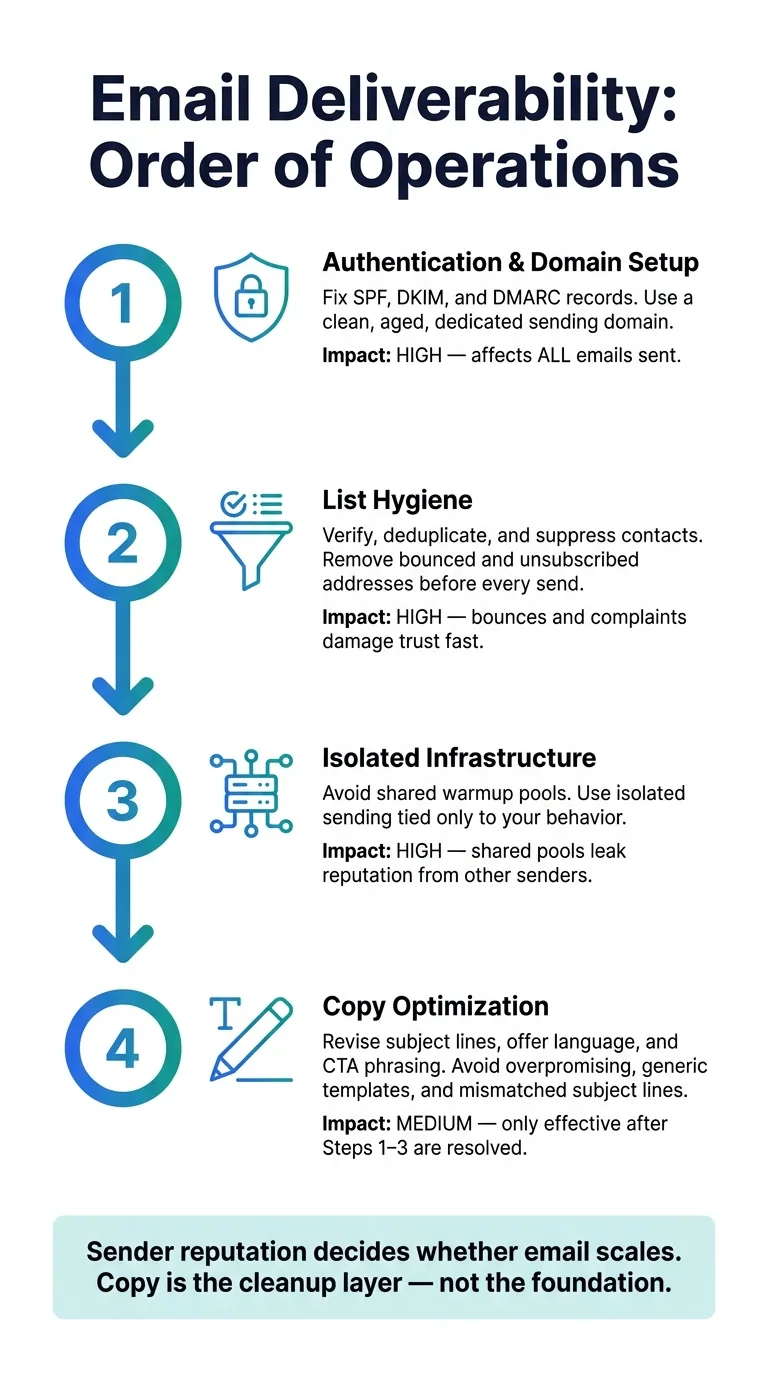
Start with deliverability basics in this order: authentication, list hygiene, isolated infrastructure, then copy.
That sequence matters. If you only have time for one cleanup pass, fix the stack in that order.
A remediation checklist for teams and agencies
-
Audit your authentication records and mailbox setup. Check that SPF, DKIM, and DMARC are set up the right way for every sending domain. Also make sure each sending domain and mailbox is clean, aged, and used by just one sender.
-
Send only verified, deduped, suppressed contacts. If someone already bounced or unsubscribed, don't email them again.
-
Use isolated warmup. Shared pools can let other senders damage your reputation.
Only after those fixes should you touch the copy.
- Then revise copy. Review subject lines, offer language, and CTA phrasing. At that stage, copy changes can actually move the needle.
Platforms like OutreachFox bundle isolated infrastructure, verification, and analytics in one system.
Conclusion: reputation is the main lever, copy is the cleanup layer
Spam words matter at the edges. But sender reputation is what actually decides whether your email can scale safely.
Infrastructure quality, warmup isolation, and list hygiene do most of the hard work. Copy comes last - not first.
Get the plumbing right, and the words tend to fall into place.
Frequently asked questions
Can proper SPF, DKIM, and DMARC setup help emails with sales language reach the inbox?+
Yes. When authentication is configured correctly and sender reputation is strong, even emails with mild sales language can still land in the inbox. The article explains that a solid technical setup gives you more room for error in copy, while weak authentication can send even clean emails to spam regardless of word choice.
How does shared warmup pool infrastructure damage deliverability for individual senders?+
Shared warmup pools tie your sender reputation to the behavior of other senders in the same pool. If another sender in that pool generates spam complaints or sends abusive campaigns, those negative signals can spill over and hurt your deliverability even when your own emails are clean. The article recommends using isolated sending infrastructure to avoid this risk.
Why does the article say list quality damages reputation faster than spam words?+
Poor list hygiene creates immediate negative signals like hard bounces and spam complaints that mailbox providers use to judge sender quality. The article notes that dirty list data—unverified contacts, stale addresses, vendor imports—can damage sender trust after just one bad send, while copy issues typically affect only specific templates or subject lines.
What order does the article recommend for fixing deliverability problems?+
The recommended sequence is: first fix authentication (SPF, DKIM, DMARC), then clean your list through verification and suppression, next move to isolated sending infrastructure, and only then revise email copy. This order prioritizes systemic reputation factors that affect all sends before addressing template-level copy issues.
What copy patterns does the article identify as most likely to cause deliverability problems?+
The article highlights overpromising language, generic templated wording, subject lines that don't match email content, overly forceful CTAs, and unnaturally polished phrasing. These patterns create trust issues by signaling mass-produced outreach or misleading intent, but they typically only become serious problems when sender reputation is already weakened by infrastructure or list quality issues.