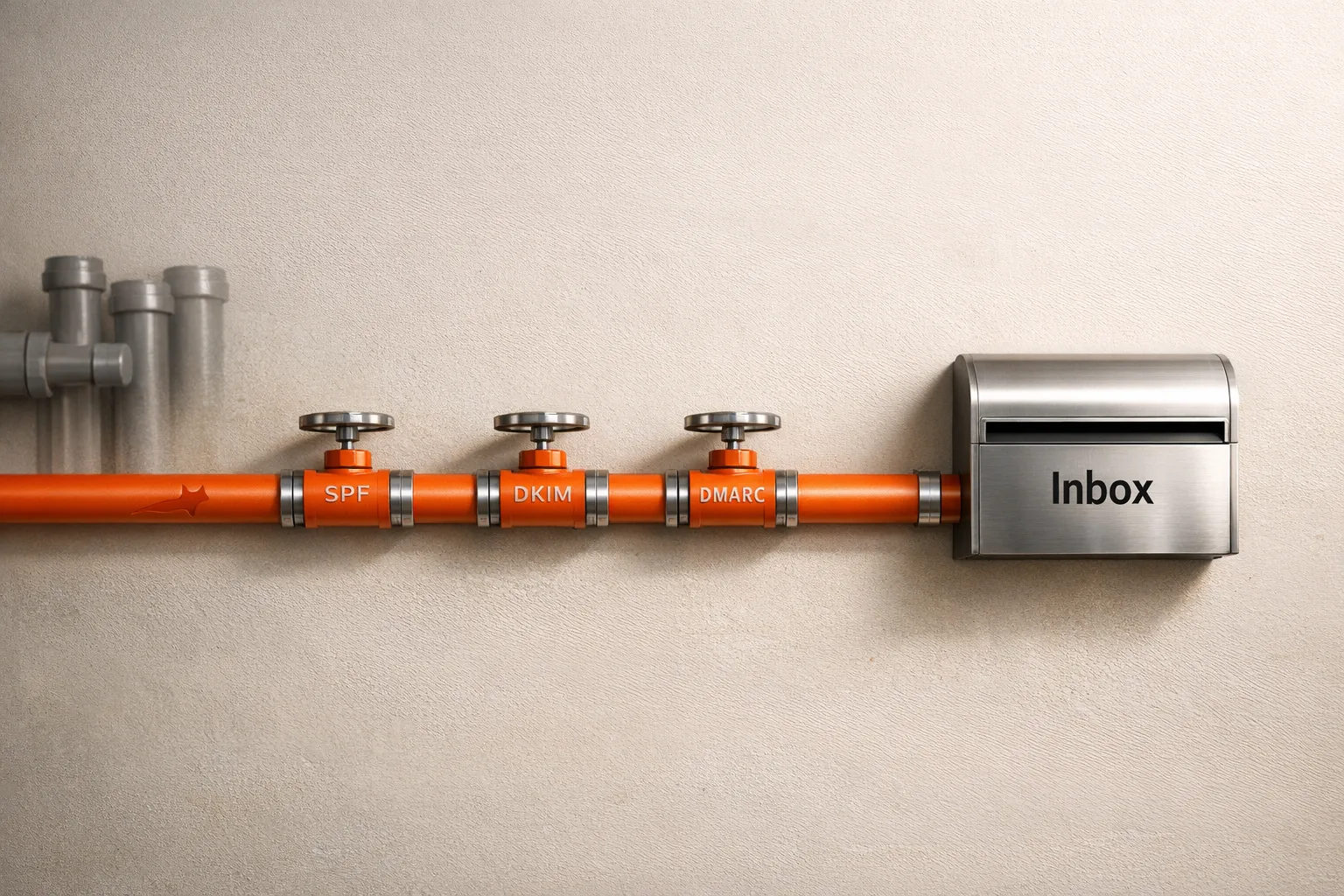
Cold email deliverability hinges on proper domain authentication, dedicated sending infrastructure, gradual mailbox warmup, conservative daily volumes, verified email lists, and avoiding spam triggers. Focus on technical setup and list qual
- Set up SPF, DKIM, and DMARC authentication to verify your domain identity
- Use dedicated sending domains and rotate multiple mailboxes to protect reputation
- Warm up mailboxes for 14 days before scaling and limit to 30-50 emails daily
- Verify email lists to keep bounce rates low and avoid spam-triggering content
- Monitor sender reputation regularly and use automation tools to simplify infrastructure management
- Recover from deliverability drops by pausing campaigns, cleaning lists, and restarting warmup
10 Cold Email Deliverability Tips That Actually Work
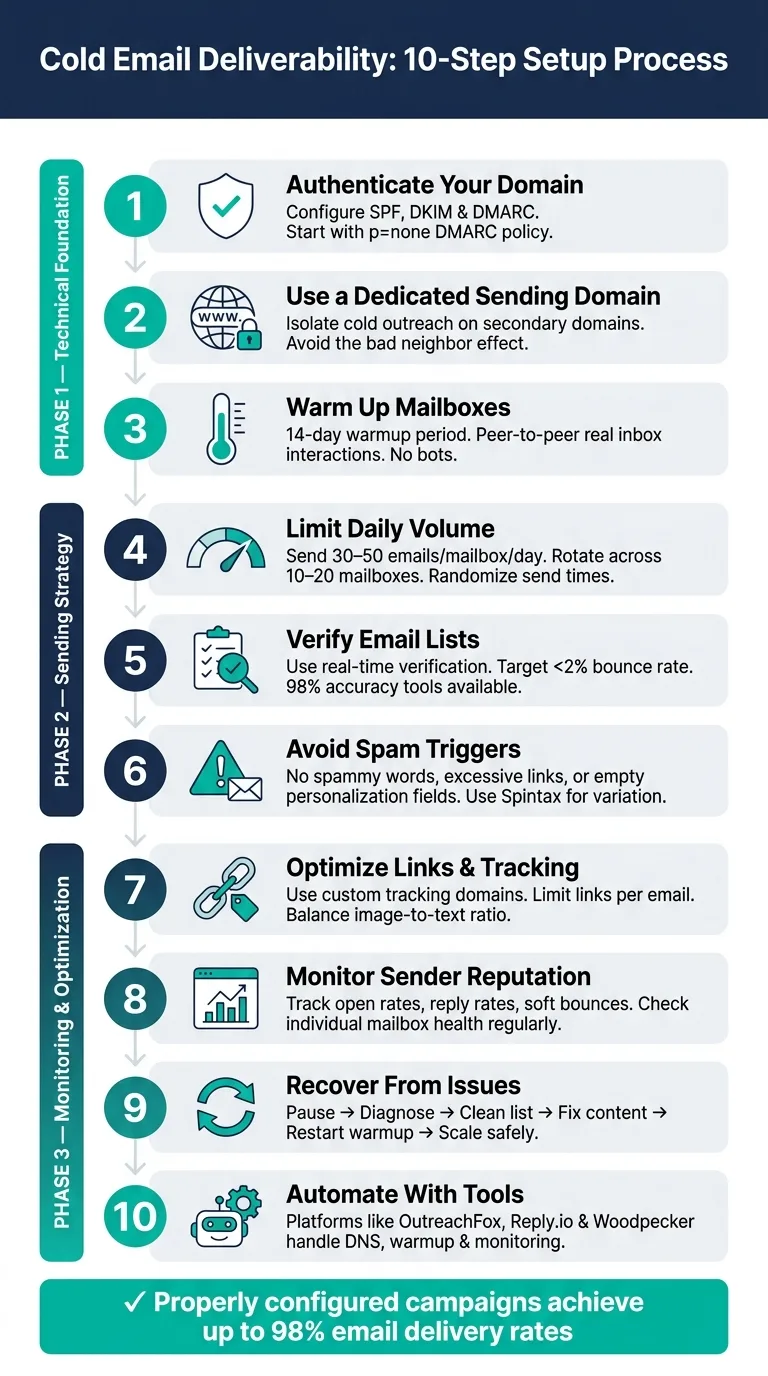
Cold emails often fail because they don't land in the primary inbox. Deliverability depends on sender reputation, domain setup, and avoiding spam triggers. Here's how to ensure your emails reach the right place:
- Authenticate Your Domain: Set up SPF, DKIM, and DMARC to verify your domain's identity.
- Use a Dedicated Sending Domain: Protect your main domain by using secondary domains for outreach.
- Warm Up Mailboxes: Gradually increase email volume to build a strong sender reputation.
- Limit Daily Volume: Stick to 30–50 emails per mailbox per day and rotate between multiple mailboxes.
- Verify Email Lists: Use tools to remove invalid addresses and reduce bounce rates.
- Avoid Spam Triggers: Steer clear of spammy words, excessive links, and poor formatting.
- Monitor Reputation: Track sender health and inbox placement to address issues early.
- Recover From Issues: Pause campaigns, clean lists, and restart warm-up if deliverability drops.
- Optimize Links and Tracking: Use custom tracking domains and limit links to maintain trust.
- Automate with Tools: Platforms like OutreachFox simplify domain setup, mailbox warm-up, and monitoring.
Key takeaway: Focus on technical setup, list quality, and gradual scaling to achieve delivery rates of up to 98%. Tools like Woodpecker, Reply.io, and OutreachFox can save time and improve results.
14 Cold Email Deliverability Lessons From 20 Million Emails (Stop Landing In Spam)
1. Set Up SPF, DKIM, and DMARC Correctly
Before sending cold emails, it's crucial to configure SPF, DKIM, and DMARC properly. These records are essential for verifying your domain's identity and ensuring your emails make it to the inbox. Without them, mail servers can’t confirm your authenticity, which can lead to delivery issues.
Here’s a quick breakdown of how each protocol works:
| Protocol | Function | Role in Deliverability |
|---|---|---|
| SPF | Specifies authorized IP addresses for sending emails | Prevents unauthorized servers from sending emails on your behalf |
| DKIM | Adds a digital signature to your email header | Confirms the message's integrity and validates the sender's identity |
| DMARC | Establishes a policy for handling authentication failures | Directs servers to deliver, quarantine, or reject emails that fail validation |
A common pitfall is misconfiguring these protocols, particularly DMARC. For instance, setting DMARC to p=reject too early can block legitimate emails if SPF or DKIM aren’t correctly aligned. A safer strategy is to start with p=none, allowing you to gather authentication reports without affecting email delivery. Use the rua tag (e.g., rua=mailto:admin@yourdomain.com) to receive these reports and monitor how your emails are handled.
Configuring DNS records manually can be tricky, especially if you’re managing multiple domains. Tools like Mailshake simplify this process with their domain setup assistant, making it easy even for non-technical users. Similarly, Reply.io automates the entire setup - from selecting a provider to configuring SPF, DKIM, and DMARC:
"Pick a provider, choose your domain, create mailboxes and Reply configures DNS automatically – SPF, DKIM, DMARC, all of it. Ready in minutes." - Reply.io
Platforms that automate these configurations often report email delivery rates as high as 98%, giving you a major advantage over teams that overlook or mishandle these critical steps.
2. Use a Dedicated Sending Domain or Isolated Infrastructure
To improve email deliverability, it's crucial to separate your cold email setup from your main business operations. One effective way to do this is by using secondary domains exclusively for cold outreach. For example, instead of using your primary domain, you could register a secondary domain like getoutreachfox.io. This ensures that if the secondary domain is flagged or blacklisted, your primary domain - which handles critical communications like client emails, invoices, and internal messaging - stays safe.
Using shared infrastructure can expose you to the "bad neighbor" effect. This happens when your email reputation is tied to others sharing the same IP. If another sender in the pool spams, your deliverability can suffer, even if your own campaigns are clean. A dedicated infrastructure eliminates this risk. For instance, Mailly's direct SMTP sending ensures you're not affected by other users' actions:
"Mailly sends emails directly from your connected SMTP accounts - not from shared IPs - meaning your domain reputation is never affected by other users." - Mailly
Another key tactic is inbox rotation. Instead of sending 200 emails daily from a single account, distribute the volume across multiple mailboxes on secondary domains. For example, use 10 mailboxes to send 20 emails each. This keeps activity under provider thresholds and mimics natural human sending patterns, which email service providers (ESPs) favor. Tools like Woodpecker are designed to support this strategy:
"Send your campaigns from multiple email accounts for better deliverability. Use as many accounts as you have connected... since the price is not per email slot." - Woodpecker
Here’s a breakdown of how shared and dedicated infrastructures compare:
| Feature | Shared Infrastructure | Dedicated/Isolated Infrastructure |
|---|---|---|
| Reputation Control | Shared with other users; vulnerable to bad neighbors | Fully controlled by your sending behavior |
| Primary Domain Risk | High, especially at scale | Low; outreach stays on secondary domains |
| Scalability | Limited by shared IP health | High; scale via inbox and domain rotation |
| Setup Complexity | Low (plug-and-play) | Moderate, but often automated by platforms |
These methods not only protect your sending reputation but also allow you to scale your efforts effectively. Keep in mind, however, that sending large volumes from new domains can trigger spam filters. Always warm up your dedicated domains before launching any campaigns.
3. Warm Up Mailboxes Before Scaling Volume
When you start with new mailboxes, they don’t have a sending history. This makes Email Service Providers (ESPs) cautious, often flagging them as suspicious. Gradually increasing your sending volume - known as warming up - helps build a reliable reputation with ESPs before diving into large-scale outreach.
Automated warmup tools make this process easier. They send emails between verified inboxes that open and engage with them, creating a history of positive interactions. However, tools that rely on bots or temporary accounts don’t generate the kind of trust signals ESPs look for.
"Warmup starts the moment you connect. Every mailbox builds sender reputation through a peer-to-peer network of real inboxes – no bots, no manual work, no extra subscriptions." - Reply.io
The typical warmup period lasts about 14 days from when you connect a new mailbox, after which it’s ready for live campaigns. Properly warmed mailboxes can reach up to 98% delivery rates. Skipping this step can have serious consequences. ESPs are quick to flag sudden spikes in email volume from new accounts, which could send your emails straight to spam - or even get your domain blacklisted.
Randomized sending times also help mimic natural email behavior:
"Your emails will be sent in random time gaps in order to imitate manual sending and decrease the chances of your email provider taking you as a spammer." - Woodpecker
Even after the initial warmup, it’s a good idea to continue warming up during campaigns. This helps maintain your sender reputation and cushions against any dips in engagement. With a strong foundation in place, you’re ready to focus on managing your sending volume effectively.
4. Keep Daily Sending Volume Conservative
Once your mailboxes are warmed up, the next step is managing your daily email volume carefully. Overloading a single mailbox with too many emails in a short time is a surefire way to harm its reputation. Email providers are quick to flag suspicious activity, such as sudden spikes in volume or identical email content, as signs of automation.
Stick to a limit of 30–50 emails per mailbox per day and spread the workload across multiple mailboxes. If you need to send more emails, it's better to add extra mailboxes or even secondary domains rather than pushing a single address beyond its limits.
A key strategy to scale up safely is inbox rotation. Instead of relying on one mailbox to handle a high volume, distribute the load across 10–20 mailboxes. Randomizing the sending intervals is also crucial - email service providers (ESPs) are good at spotting uniform patterns. As Woodpecker explains:
"Your emails will be sent in random time gaps in order to imitate manual sending and decrease the chances of your email provider taking you as a spammer."
Tools like Woodpecker can help automate this process by detecting when you're nearing provider limits and adjusting the sending pace accordingly.
Here’s a quick comparison of different approaches to scaling email outreach:
| Setup | Risk Level | Volume Capacity | Deliverability Stability |
|---|---|---|---|
| Single mailbox, high volume | High | Limited by provider caps | Vulnerable to spikes |
| Multiple mailboxes, rotated | Low | Scales with mailbox count | Stable with conservative per-mailbox loads |
| Dedicated sending domains | Very low | Virtually unlimited | Highest, with proper warmup |
5. Keep Bounce Rates Low With Verified Lists
High bounce rates can hurt your sender reputation, signaling to email service providers (ESPs) that you're using low-quality or unverified lists.
To avoid this, always run your email lists through a verification tool before launching a campaign. This helps prevent hard bounces (caused by invalid or misspelled email addresses) and soft bounces (temporary delivery issues). For example, Snov.io's Email Verifier boasts 98% accuracy and even bypasses graylisting to catch addresses that standard checks might miss. Meanwhile, Woodpecker takes a different route by verifying each email address in real time, right before sending. This ensures that even recently deactivated addresses are flagged:
"We check your prospects' email addresses right before they are sent and if they are incorrect the email will not be sent." - Woodpecker
Another way to minimize bounce issues is by sourcing leads from pre-verified databases. Lemlist, for instance, uses a "waterfall enrichment" process that pulls contact data from over 25 providers at once, validating email addresses before they even enter your sending queue.
Keeping bounce rates low is essential for building a strong sender reputation, which serves as the backbone of any email deliverability strategy.
6. Avoid Content Patterns That Trigger Spam Filters
Once your sending infrastructure is set up, the next step is refining your email content to ensure it doesn’t land in spam folders. Even if your domain settings are perfect, poorly crafted content can still raise red flags with spam filters. These filters don’t just watch for obvious issues; they evaluate the entire email, from how the subject line is worded to where links are placed. So, while the technical setup is critical, crafting your email content thoughtfully is just as important.
Some words and phrases can set off alarms. Spam filters look for language tied to promotions, urgency, or financial offers, as well as patterns that seem overly repetitive. For example, sticking to the same "intro-pitch-CTA" formula in every email or sending identical messages can make your emails look suspicious. Woodpecker explains it well:
"You can increase deliverability by making sure your emails don't contain any spam-triggering words or links that might seem suspicious to anti-spam filters."
To avoid falling into predictable patterns, consider using Spintax to randomize elements like subject lines and opening sentences. This approach ensures your emails are varied and harder for filters to flag. A great example is Virtuance, which shifted from generic templates to highly personalized emails and saw an impressive 83% open rate.
Another common issue is empty custom fields. If you use placeholders like {{first_name}} and they aren’t filled in, your email can come across as broken or overly robotic. To avoid this, use tools that identify and fix empty personalization fields before sending.
Lastly, always run a spam score check on your email copy before scaling your campaign. Many platforms now offer AI tools that scan your content for problematic words or structural issues in real time. These tools give you the chance to make adjustments and protect your sender reputation before hitting "send".
7. Manage Links, Images, and Tracking Settings
Spam filters don't just look at your content - they also scrutinize links, images, and tracking settings. Mismanaging these can seriously impact your email deliverability.
Too many links can be a red flag. Keep the number of links in your email to a minimum, and make sure they lead to trustworthy domains. This helps maintain your sender reputation and ensures your emails are more likely to land in the inbox.
When it comes to images, balance is key. A high image-to-text ratio can make your email look impersonal and trigger spam filters. Emails with plain text or minimal formatting often perform better in terms of deliverability.
Tracking settings also need careful handling. Open and click tracking can backfire if you're using shared tracking domains, as they may carry a bad reputation from other senders. Instead, opt for a custom tracking domain connected to your sending domain. This isolates your reputation and keeps it intact.
"In-app copy analyzer to coach you on spam words." - Mailshake
Before hitting send, always check your spam score. Tools like Mailshake provide in-app copy analyzers that highlight potential issues, such as spammy words or problematic links, before your email goes live. Addressing these problems early can protect your sender reputation and improve your email performance.
8. Monitor Sender Reputation and Inbox Placement Regularly
After setting up and warming up your email infrastructure, keeping a close eye on performance is key to maintaining strong deliverability over time. Problems often creep up gradually, so if you notice a sudden drop in open rates, click-through rates, reply rates, or an increase in soft bounces, it’s a red flag. These shifts often mean your emails are landing in spam folders. Monitoring tools can help you identify these issues early and take action to improve your platform's performance.
Regular checks are essential - not just when something seems off. It's not enough to track campaigns; you also need to monitor the reputation of individual mailboxes. For example, Reply.io offers tools to track inbox reputation, warmup progress, and daily activity. This makes it easier to spot and fix issues before they snowball. According to Reply.io, their platform achieves an average email delivery rate of 98%.
"Reply offered us a platform where we're sure that the right emails go out at the right time. It helped us get reply rates of over 65%." - Sjors Mahler, Sales & Growth Lead, pr.co
Other tools like Woodpecker and Snov.io add another layer of support. They provide centralized dashboards and real-time alerts to help diagnose placement issues quickly. These features make it easier to act fast and resolve problems at the mailbox level. Snov.io, for instance, includes an email verification tool with a 98% accuracy rate, which helps maintain clean email lists and reduces bounce rates - both critical for protecting your sender reputation.
9. Recover Sender Reputation After Deliverability Issues
If your email deliverability takes a hit, the first step is to pause or drastically reduce your email campaigns. Sending large volumes while your reputation is compromised can worsen the damage and might even lead to permanent blacklisting.
After pausing, it's time to dig into the problem with a thorough diagnostic. Start by checking that your domain authentication records (like SPF, DKIM, and DMARC) are correctly set up. Look into your domain's age and reputation score, and analyze your email content with a spam-score tool to identify any problematic words or links. These steps often pinpoint the root cause of deliverability issues.
Next, focus on cleaning your email list. Remove invalid addresses, hard bounces, and contacts who haven’t engaged in a long time. Using email verification tools, such as Snov.io's verifier, can speed up this process and ensure accuracy.
Once your list is clean, restart your warm-up protocols. Automated warm-up tools are particularly helpful here, as they simulate real inbox interactions like opens, replies, and "not spam" signals. This process usually takes two to four weeks of consistent, low-volume sending to start improving your sender reputation.
As you reintroduce sending, distribute the workload evenly across multiple domains or mailboxes. Avoid relying on one domain that's still recovering - spreading the load reduces stress on any single inbox and helps stabilize your reputation.
Woodpecker summarizes this approach well:
"Deliverability Monitor... Spot upcoming deliverability problems at one glance and solve them so your domain reputation stays high." - Woodpecker
Summary of Recovery Steps
| Recovery Step | Action | Tool/Feature |
|---|---|---|
| Pause sending | Stop or significantly reduce campaign volume | Campaign settings / sending limits |
| Diagnose | Audit authentication records and domain reputation | Domain audit / health check |
| Clean lists | Remove invalid and risky addresses | Email verifier / list cleaning |
| Fix content | Remove spam-triggering words and links | Copy analyzer / spam-score tool |
| Rebuild reputation | Restart warm-up with real inbox interactions | Automated warm-up tool |
| Scale safely | Rotate sending across multiple mailboxes | Sender/inbox rotation |
10. Use OutreachFox to Automate Infrastructure Management
Managing the technical side of cold email campaigns can be a time-consuming process. Tasks like setting up SPF, DKIM, and DMARC, warming up mailboxes, provisioning dedicated IPs, and monitoring sender health can eat up hours every week. That’s where OutreachFox steps in to simplify and automate the entire process.
With OutreachFox, you get pre-warmed mailboxes that are ready to go - no need to manually tweak DNS settings for SPF, DKIM, or DMARC. The platform also uses isolated infrastructure with dedicated IPs for your campaigns, which means your sending reputation stays protected. Unlike shared IP pools, where one user’s bad practices can hurt everyone, this setup keeps your deliverability under your control.
OutreachFox also offers customized warmup profiles tailored to your specific needs, instead of relying on a generic one-size-fits-all approach. Plus, its bulk provisioning feature allows teams to set up and configure multiple mailboxes at once, saving even more time.
Dedicated IP vs. Shared IP: Side-by-Side Comparison
Let’s dive deeper into how dedicated IPs stack up against shared IPs. The choice between the two boils down to one key consideration: how much control do you want over your sender reputation?
With a shared IP, your deliverability depends on everyone else using that same IP address. If another sender has poor practices - like sending spammy content - it can negatively impact your deliverability, even if your own lists and emails are spotless. This is often referred to as the "bad neighbor" effect, and it’s frustrating because you have no control over it.
On the other hand, a dedicated IP eliminates this risk. Your reputation is entirely based on your own sending behavior. However, it does come with a catch: you’ll need to properly warm up the IP before scaling your outreach.
Here’s a quick breakdown of the differences:
| Feature | Shared IP | Dedicated IP |
|---|---|---|
| Reputation Control | Low - tied to other senders | High - based solely on your activity |
| Deliverability Risk | High - "bad neighbor" issues can arise | Low - only your own practices affect it |
| Scalability | Best for low-to-medium volume | Best for high-volume, consistent sending |
| Setup Effort | Instant - pre-warmed by the provider | Requires a warm-up period |
| Ideal For | Small teams, beginners | Agencies, enterprises, and high-volume senders |
This table highlights the trade-offs between the two options, emphasizing why infrastructure plays such a critical role in cold email success.
"Outboundry uses cloud-based infrastructure with dedicated IPs and smart daily limits to mimic natural human activity." - Outboundry
For most B2B senders, investing in a dedicated IP is the better long-term choice. While the warm-up process takes effort, the ability to fully control your sender reputation makes it worth the initial work.
Conclusion
Maintaining strong cold email deliverability requires ongoing effort and attention to detail. Every tactic plays a role in building a solid foundation that keeps your emails landing in inboxes where they belong.
Start with the basics: set up proper authentication protocols, use dedicated sending domains, and implement a 14-day warm-up period. Keep bounce rates low by working with verified email lists, and steer clear of content that could trigger spam filters. These steps help ensure your emails hit the primary inbox instead of the dreaded spam folder.
Consistently achieving delivery rates as high as 98% comes down to vigilant monitoring. Regularly review your domain health, run inbox placement tests, and address DNS issues before they escalate into bigger problems. By doing this, you protect your sender reputation and keep your outreach efforts on track.
Automation makes this process much easier. Tools like OutreachFox take care of tasks like configuring SPF, DKIM, and DMARC, setting up pre-warmed mailboxes, and offering real-time analytics across all your accounts. This allows you to focus on what truly matters - closing deals.
"The unlimited email warmup feature alone justified the switch. Our inbox placement improved and bounce rates dropped noticeably." - Marcus Lee, Outbound Lead, PipelineForge
Frequently asked questions
What daily sending volume should I maintain per mailbox to avoid spam flags?+
You should limit sending to 30-50 emails per mailbox per day. If you need to send more emails, it's better to add extra mailboxes or secondary domains rather than exceeding this limit on a single address. Distributing volume across 10-20 mailboxes with randomized sending intervals helps mimic natural human behavior and prevents ESP detection.
How long does the mailbox warm-up process take before I can start cold outreach?+
The typical warm-up period lasts about 14 days from when you connect a new mailbox. During this time, automated warmup tools send emails between verified inboxes that open and engage with them, building positive sender reputation. Properly warmed mailboxes can reach up to 98% delivery rates.
Why should I use a secondary domain for cold email instead of my main business domain?+
Using a secondary domain for cold outreach protects your primary domain from being flagged or blacklisted. If the secondary domain encounters deliverability issues, your main domain - which handles critical communications like client emails and invoices - remains safe and unaffected. This isolation is essential for protecting your business reputation.
What should I do immediately if my email deliverability suddenly drops?+
Pause or drastically reduce your email campaigns immediately to prevent further damage. Then audit your authentication records (SPF, DKIM, DMARC), clean your email list by removing invalid addresses and hard bounces, check content for spam triggers, and restart warm-up protocols. This recovery process typically takes two to four weeks of consistent, low-volume sending.
How does using a dedicated IP differ from shared IP infrastructure for cold email?+
With a dedicated IP, your sender reputation is based solely on your own sending behavior, eliminating the 'bad neighbor' effect where other users' poor practices hurt your deliverability. Shared IPs carry higher deliverability risk because your reputation is tied to all users on that IP. Dedicated IPs require a warm-up period but offer complete control over your sender reputation.
What authentication protocols must be configured before sending cold emails?+
You must properly configure SPF, DKIM, and DMARC records for your domain. SPF specifies authorized IP addresses for sending, DKIM adds a digital signature to verify message integrity, and DMARC establishes policies for handling authentication failures. Start with DMARC set to 'p=none' to gather reports without affecting delivery before moving to stricter policies.
How can I safely scale my cold email volume beyond 50 emails per day?+
Scale by adding multiple mailboxes and rotating sending across them rather than increasing volume on a single mailbox. For example, use 10 mailboxes sending 20 emails each instead of one mailbox sending 200 emails. This inbox rotation approach keeps activity under provider thresholds, mimics natural sending patterns, and maintains strong deliverability across all accounts.