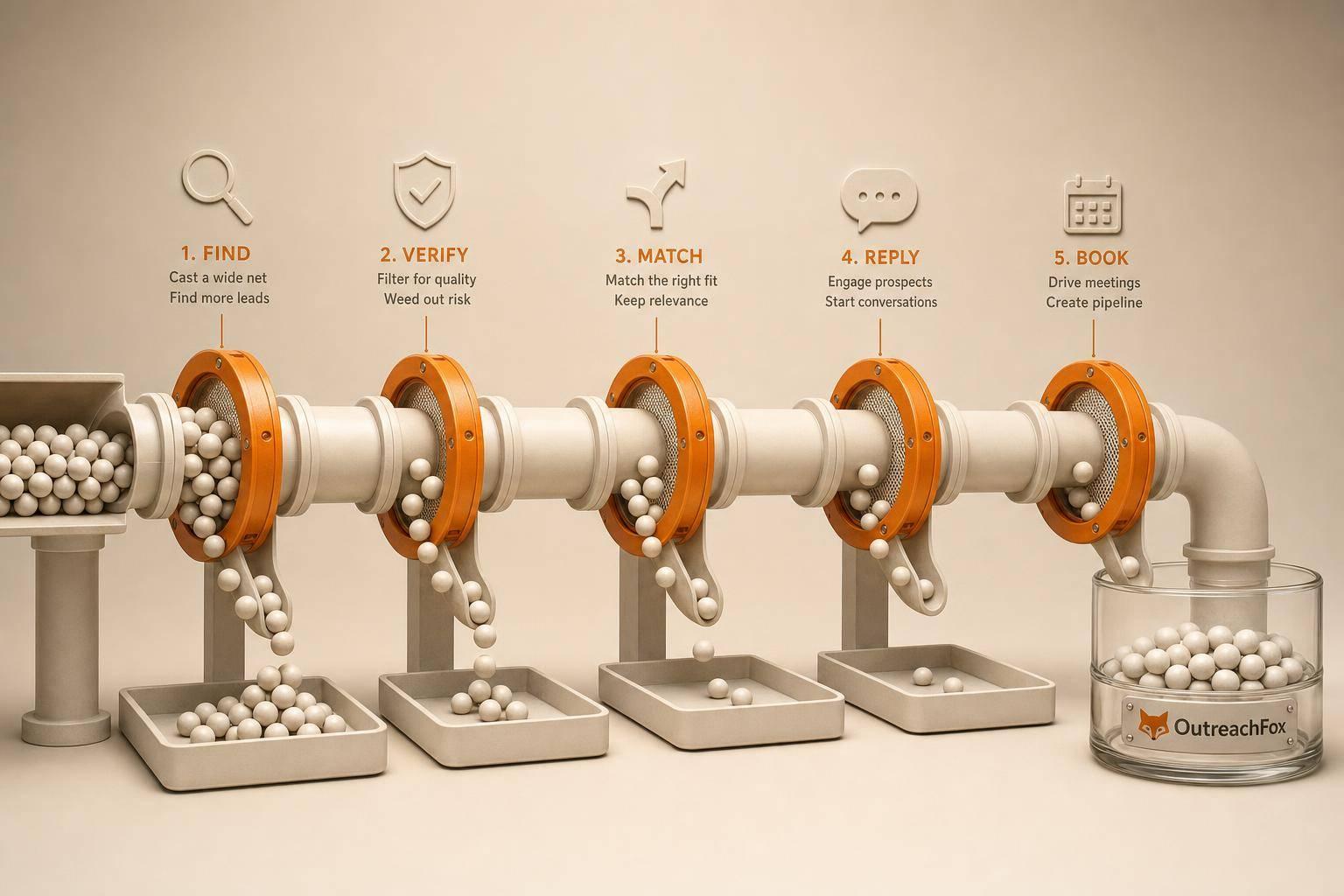
Judge lead sources by five metrics: match rate, verification pass rate, bounce rate, reply rate, and meeting rate. Waterfall-enriched lists typically deliver the best mix of coverage and low bounce risk when properly verified before send.
- Keep total bounce under 2-3% and hard bounce under 1% for healthy deliverability.
- Expect 3-5% cold reply rates; well-targeted campaigns can hit 5-10% or higher.
- Waterfall-enriched lists beat single-provider data by pulling from 50+ sources and verifying pre-send.
- Internal CRM lists perform best when segmented by recent activity and reverified regularly.
- Meeting rate typically lands around 0.5-2% of emails sent across quality sources.
- Vendor bulk lists need the strictest pre-send QA to avoid bounce spikes.
Lead Source Benchmarks: Match Rate, Bounce, Reply
Most lead lists fail for the same reason: they look usable before send, then miss on verification, bounce too much, or bring weak reply volume. I'd judge every source with five numbers: match rate, verification pass rate, bounce rate, reply rate, and meeting rate.
If I want a simple read on source quality, I use these rules first:
- Keep total bounce under 2%–3%
- Keep hard bounce under 1%
- Expect cold reply rates around 3%–5%
- Well-targeted sends can hit 5%–10%+ replies
- Meeting rate often lands around 0.5%–2% of emails sent
Here's the short version:
- Internal CRM lists often do best when records are current and tied to recent activity.
- Single-provider data is easy to buy and use, but one source means one coverage limit.
- Waterfall-enriched lists usually give the best mix of reach and lower bounce risk because they pull from many providers and verify before send.
- Vendor bulk lists can add volume, but they need the most checking before launch.
Top 3 Metrics for Evaluating Cold Email Campaigns
Quick Comparison
| Source Type | Match Rate | Verification Pass Rate | Bounce Risk | Reply/Meeting Outlook |
|---|---|---|---|---|
| Waterfall-enriched | Highest in most cases | High | Lowest when verified right before send | Strong when targeting is tight |
| Internal CRM | Depends on record age | Mixed; recheck old records | Goes up as data gets old | Often best in high-fit segments |
| Single-provider | Good, but capped by one database | Needs a new verification pass | Medium | Depends on ICP overlap |
| Vendor-supplied | Unstable | Often weaker without recheck | Highest | Usually lowest per send |
If I had to sum up the full article in one line, it would be this: don't judge a lead source by list size - judge it by verified coverage, low bounce, and meetings booked.
1. OutreachFox waterfall-enriched lists
Coverage
OutreachFox waterfalls across 50+ providers to lift match rate on niche, small-company, and hard-to-source roles. That makes a big difference when one database comes up short and doesn't return enough deliverable emails.
Verification quality
Built-in verification filters invalid mailboxes before send. So when you judge list quality, look at verified pass rate and bounce rate, not just the raw number of contacts found.
Deliverability risk
Dedicated campaign IPs isolate sender reputation. In plain English, bounce risk comes from your list and your sending behavior, not from a shared sending pool.
Pipeline yield
These lists should be judged by verified delivery, positive reply rate, and meeting rate - not raw contact volume. The next sections use that same scorecard across internal, single-provider, and vendor lists.
2. Internal CRM lists
Use the same scorecard for internal CRM lists: match rate, verification pass rate, bounce rate, reply rate, and meeting rate.
Coverage
CRM coverage only goes as far as what your team has already collected. If you're going after new verticals or different job titles, you'll usually need enrichment.
Use waterfall enrichment to add firmographics and recent activity signals. That helps fill in the gaps. But coverage isn't the main issue here. Freshness matters more. If records are stale, they often fail even after enrichment.
Verification quality
Run CRM records through enrichment and email verification before you send anything. That's the best way to keep the data current.
Even then, don't treat all verified records the same. They still need segment-level filtering before send.
Deliverability risk
The main risk in an internal CRM comes from stale or incomplete records. A contact may look fine on paper and still cause problems once the campaign goes live.
Before sending, run the segment through an email verification pass. Then split recently verified contacts from stale or unverified records. That extra step can save you from a messy bounce problem.
Pipeline yield
Internal CRM lists often drive the strongest pipeline when you segment them around recent activity and fit signals.
High-yield segments usually come from signals like:
- Firmographics
- Recent activity
From there, the next move is pretty simple: expand high-fit, recent-activity segments, keep an eye on partially enriched records, and retire stale contacts.
3. Single-provider prospecting data
Single-provider sources are fast. But one database also means one set of blind spots.
Email find rate
Coverage from a single provider is often broad, but it won't be even across the board. A database can still miss certain verticals or clusters of job titles. If your ICP falls outside the provider's strongest areas, you'll run into gaps. One source can only take you as far as its own coverage ceiling.
That said, coverage only helps if the export makes it through verification.
Verification quality
Look for exports that map cleanly to your CRM fields and show a clear source trail. Then run a new verification pass on every export and remove anything that doesn't meet your quality bar before launch.
Stale or incomplete records are the main deliverability risk. Catching them before you send is what helps keep bounce rates in check.
Pipeline yield
Reply rates and meeting rates come down to ICP overlap and recent CRM fit. To get more from the data, combine the provider export with your own internal data and apply new filters before sequencing.
When that fit starts to slip, vendor-supplied lists are usually the first thing to fail at verification.
4. Vendor-supplied lists
Treat vendor lists the same way you'd treat any other lead source: score them on the same five metrics - match rate, verification pass rate, bounce rate, reply rate, and meeting rate.
That matters because a big list can look good on paper and still fall apart once you start sending. The only thing that counts is whether the records fit your target, verify cleanly, and turn into replies and meetings.
Coverage
Judge coverage by ICP-fit count, not database size.
If you're going after a narrow segment, ask for the matched record count filtered by industry, company size, and title. Don't let the conversation drift back to total database size. That number sounds impressive, but it doesn't tell you how many contacts fit what you need.
And here's the catch: even a high match rate isn't enough if the export doesn't verify cleanly. A list that "matches" but fails verification is still a bad list.
Verification quality
Data quality should show up in the export, not the badge.
Look for structured fields like:
- employee count
- funding round
- capital raised
Those fields make it easier to segment cleanly and spot weak data before launch. If the vendor can't explain refresh cadence, reverify the export before send. That step matters more than most teams think. Poor refresh cadence can turn a polished-looking file into bounce risk fast.
Deliverability risk
Vendor lists need the strictest pre-send QA: verify, sample-test, and watch bounce rate closely on the first send.
Why so strict? Because static exports age fast. Stale records are the main risk. A file may look fine when you get it, then cause trouble the moment it hits inboxes.
After send, judge vendor quality by reply rate and meeting rate, not just list size. A giant export that doesn't get replies isn't helping much.
Pipeline yield
Pipeline yield comes down to ICP fit and field depth.
Strong exports make segmentation cleaner, which usually leads to better reply rates and higher meeting rates. Weak exports do the opposite. They muddy targeting, make messaging less precise, and drag down output.
So keep vendor scoring simple and consistent: use the same scorecard every time - match rate, verification pass rate, bounce rate, reply rate, and meeting rate.
Coverage, Verification, Deliverability, and Pipeline: Side-by-Side Comparison
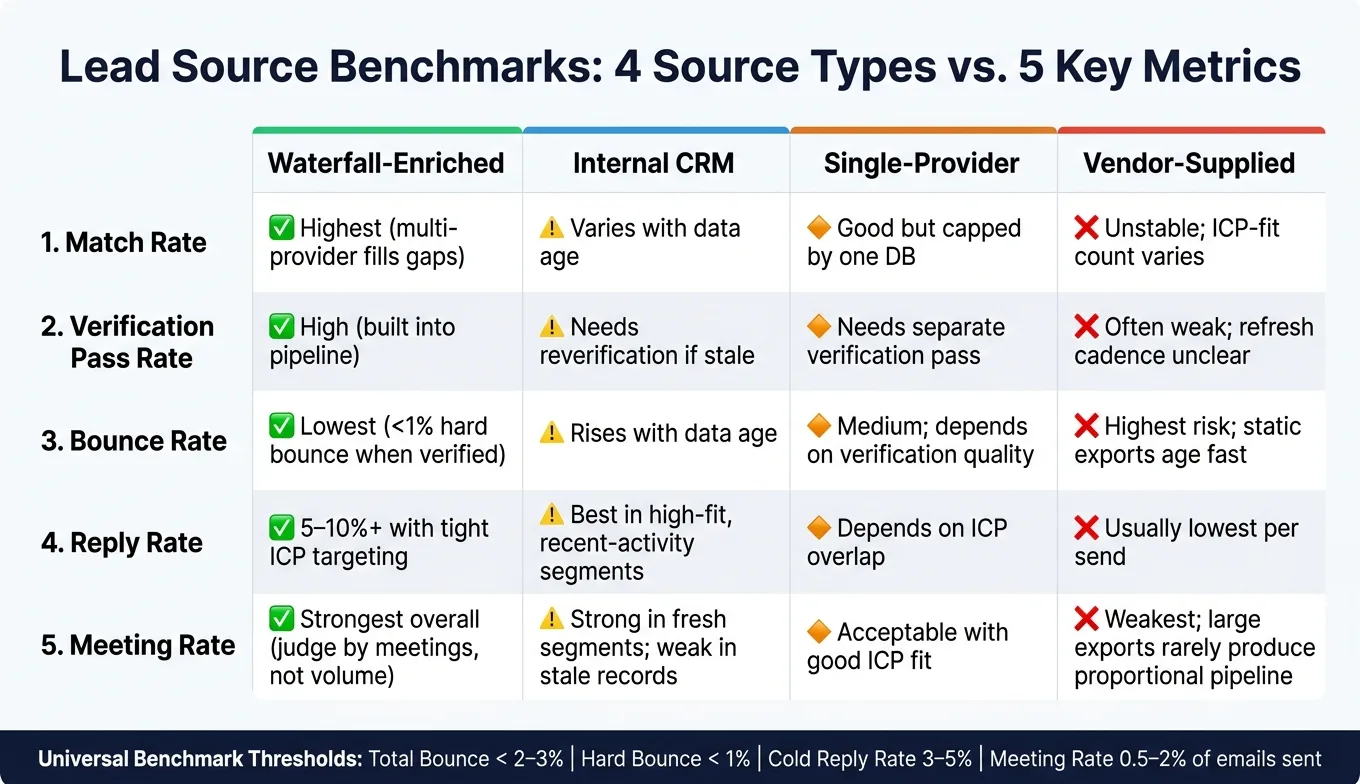
Here's the side-by-side view of the four source types across the five metrics that matter most. Start with the table, then use the notes below to see what shifts by source type.
| Metric | Waterfall-Enriched | Internal CRM | Single-Provider | Vendor-Supplied |
|---|---|---|---|---|
| Match Rate | Highest; multi-provider sequencing fills gaps single sources miss | Varies with data age; stale records reduce usable coverage | Usually lower than waterfall; one database has one coverage ceiling | Varies widely; ICP-fit count matters more than database size |
| Verification Pass Rate | High; enrichment and verification run in the same pipeline | Needs reverification when records are stale | Needs a separate verification pass before send | Often needs reverification; refresh cadence is rarely disclosed |
| Bounce Rate | Closest to sub-1% hard bounce when verification is current | Rises with data age; stale segments need reverification before send | Depends on verification quality at export | Highest risk; static exports age fast and need strict pre-send QA |
| Pipeline Yield (Positive Reply Rate + Meeting Rate) | Strongest when ICP targeting is tight; judge by meetings, not volume | Strongest in high-fit, recent-activity segments; weak in stale or unverified records | Depends on ICP overlap; supplement with internal data to improve yield | Weakest overall; large exports rarely produce proportional pipeline |
Coverage benchmarks by source type
Coverage matters most at the top of the list. But coverage alone doesn't mean much if the contacts can't pass verification.
Waterfall enrichment usually leads on match rate because it checks multiple providers in sequence. That helps fill gaps a single source misses. If both match rate and verification pass rate stay strong, that's a good sign you can scale.
Single-provider data hits its limit sooner. One database can only go so far, so gaps tend to show up faster inside your ICP. When that happens, clean the list and add another source.
Internal CRM lists can look solid at first glance. On paper, the contact count may seem fine. In practice, older records chip away at reachable coverage, so it's smart to monitor age and reverify before you ramp volume.
Vendor-supplied lists are all over the map. A big file can look good until you check fit. What matters more is how many contacts match your ICP, not how many rows came in the export. If fit is weak, verify hard or move on.
Verification pass rate and pre-send filtering
Verification tells you which matched records are safe to send to. That's the line between covered and usable.
Waterfall-enriched lists tend to do best here because enrichment and verification happen in the same pipeline. Internal CRM data and vendor exports usually need a separate reverification pass when records are old. That extra step matters. Skip it, and you're sending to names that may still exist in the file but not in the inbox world.
Bounce rate thresholds and deliverability risk
Bounce rate is where source quality stops being theory and starts hitting deliverability.
Use it to split safer sources from riskier ones. Waterfall-enriched data should stay lowest. Stale CRM segments and vendor files need reverification before send. And if total bounce hits 3%, pause and review the source before you keep going.
That's the gut check. If a file looks fine but bounces like crazy, it isn't fine.
Reply rate, positive replies, and meeting rate
Total reply volume can fool you. A source can generate plenty of replies and still produce weak pipeline.
What counts more are positive replies and meetings booked. Two sources might look similar if you only check raw engagement, yet one drives actual pipeline while the other mostly brings noise. Judge source quality by meetings, not just replies.
Pros and Cons by Source Type
The scorecard above shows what happened. This section focuses on what to do next.
Where each source type performs best
Each source type has its own sweet spot. Some are better for broad coverage. Others work best for fresh CRM fit, one-vendor ease, or fast bulk volume.
Waterfall-enriched lists, including OutreachFox workflows, tend to work best when you need broad coverage without letting bounce risk get out of hand. Internal CRM lists usually do best in high-fit segments tied to recent activity. When the data is fresh and you have real relationship context, reply and meeting rates are often strongest. Single-provider data makes sense for teams with a narrow, clearly defined ICP that one vendor covers well. Vendor-supplied lists can help when you need volume fast, but they need the most care before you send anything.
Use the wrong source for the wrong job, and that edge fades fast.
Common failure points by source
Here's where each source type usually breaks down:
- Waterfall-enriched lists can underperform when ICP fit gets too broad. Match rate may stay high, but positive reply rate stays weak.
- Internal CRM lists slip when records get old, which pushes bounce up and reply down.
- Single-provider data runs into trouble when the vendor's coverage ceiling cuts match rate.
- Vendor-supplied lists become risky when refresh timing is unclear, which can push bounce risk up before send.
Decision table: expand, monitor, clean, reverify, or retire
Turn those signals into action.
| Source Type | Signal | Next Step |
|---|---|---|
| Waterfall-Enriched | Match rate strong, verification pass rate high, bounce low, meeting rate rising | Expand - scale volume and keep ICP targeting tight |
| Waterfall-Enriched | Match rate strong, meeting rate flat despite good deliverability | Monitor - review ICP fit and sequence quality |
| Internal CRM | Recent-activity segment, verification current, bounce low | Expand - prioritize this segment first |
| Internal CRM | Records aging, bounce creeping up | Reverify - run the list through verification before the next send |
| Internal CRM | Bounce rising, positive reply rate soft | Clean - remove stale records and segment by last activity date |
| Single-Provider | Match rate adequate, bounce low, meeting rate acceptable | Monitor - watch the coverage ceiling and supplement if gaps appear |
| Single-Provider | Match rate declining, ICP gaps visible | Clean - remove low-confidence records and add a second source |
| Vendor-Supplied | ICP fit strong, verification pass rate solid, bounce low | Monitor - track closely and reverify before each new send cycle |
| Vendor-Supplied | Bounce rising, meeting rate falling, poor ICP fit | Retire - stop using the source |
Conclusion
The best lead source isn't the one with the biggest list or the loudest vendor claim. It's the one that keeps clearing the benchmarks that matter: match rate, verification pass rate, bounce rate, reply rate, and meeting rate.
Buying volume is easy. Turning that volume into pipeline is the part that tells you whether a source is worth scaling or worth cutting. That's why freshness sits at the center of the decision.
Run the scorecard every send cycle because data decays fast. Real-time bounce and reply tracking helps you spot source decay early. Then use the decision table the way it was meant to be used: expand winners, watch drift, reverify stale records, and retire chronic underperformers. Winning teams know which sources clear the benchmarks - and when it's time to walk away from low reply rates.
Frequently asked questions
What are the five core metrics recommended for judging lead source quality in this framework?+
The five metrics are match rate, verification pass rate, bounce rate, reply rate, and meeting rate. These metrics provide a complete picture of source quality from initial contact discovery through pipeline generation, rather than relying on list size alone.
Why do waterfall-enriched lists typically achieve higher match rates than single-provider data?+
Waterfall-enriched lists pull from 50+ providers in sequence, filling gaps that a single database would miss. This multi-provider approach increases coverage across niche roles, small companies, and hard-to-source positions where one database alone hits a coverage ceiling.
What bounce rate thresholds should trigger a review of your lead source?+
Keep total bounce under 2-3% and hard bounce under 1%. If total bounce hits 3%, pause and review the source before continuing to send, as this indicates the data quality has degraded enough to threaten deliverability.
When should you expand versus retire an internal CRM segment according to the decision table?+
Expand CRM segments when they show recent activity, current verification, and low bounce rates. Retire or clean segments when bounce is rising and positive reply rate is soft, which signals stale records that need removal or reverification before the next send.
Why do vendor-supplied lists require the strictest pre-send quality assurance?+
Static exports from vendors age quickly, and refresh cadence is rarely disclosed clearly. This creates the highest bounce risk among all source types, requiring verification, sample testing, and close bounce monitoring on the first send to avoid deliverability problems.
What makes internal CRM lists potentially stronger than purchased data for pipeline generation?+
Internal CRM lists often drive the strongest pipeline in high-fit segments with recent activity signals, because they include relationship context and real engagement history. However, this advantage disappears rapidly as records age and verification currency declines.
How should you measure pipeline yield rather than just engagement volume?+
Judge sources by positive replies and meetings booked, not total reply volume. Two sources might generate similar raw engagement numbers, but only one may produce actual pipeline, so meeting rate is the true indicator of source quality.