Build predictable pipeline by combining email and LinkedIn in 10-15 day sequences, connecting to CRM routing rules, and monitoring deliverability metrics weekly.
- Use email for direct asks and LinkedIn for building familiarity across sequences
- Run 10-15 business day cadences with CRM rules that pause automation when humans engage
- Target accounts using ICP filters and buying signals before enrollment begins
- Monitor inbox placement and bounce rates before judging copy or engagement metrics
- Isolated sending infrastructure prevents one campaign from damaging workspace-wide deliverability
- Review channel health first, sequence engagement second, pipeline impact third each week
Building a Predictable Pipeline: The GTM Team's Guide to Multichannel Outreach
If you want a steady pipeline, don’t lean on one channel. I’d start with email for the ask, LinkedIn for familiarity, and a 10- to 15-business-day sequence tied to CRM rules that stop outreach when a rep steps in.
Here’s the short version:
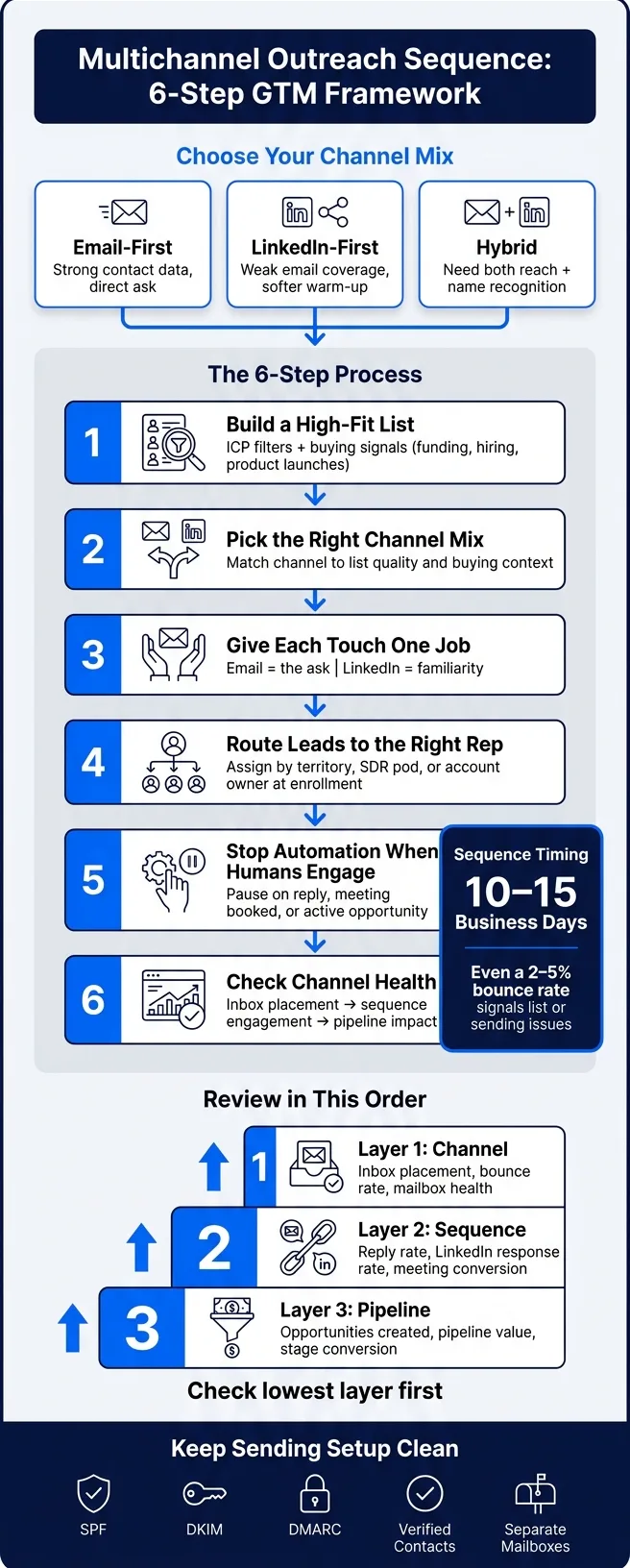
- I use email-first when contact data is strong
- I use LinkedIn-first when email coverage is weak or I want a softer start
- I use a hybrid motion when I need both reach and name recognition
- I connect outreach to CRM rules for owner assignment, reply handling, and pauses
- I watch inbox placement, bounce rate, reply rate, meeting rate, and pipeline value every week
- I keep sending setup clean with SPF, DKIM, DMARC, verified contacts, and separate mailboxes
A simple system usually works best:
- Build a high-fit list with ICP filters and buying signals
- Pick the right channel mix
- Give each touch one job
- Route leads to the right rep
- Stop automation when a human starts the conversation
- Check channel health before judging copy or results
A few numbers shape the whole motion: a sequence should usually run for 10 to 15 business days, and even a 2% to 5% bounce rate can point to list or sending issues. If inbox placement drops, the rest of the funnel data gets harder to trust.
This guide breaks down how I’d set up the mix, timing, CRM workflow, and weekly review process so pipeline stays steady instead of swinging from one channel problem to the next.
How to build a multichannel sequence: channel mix, timing, and message roles
Choose email-first, LinkedIn-first, or hybrid based on list quality and buying context
Your starting channel should match three things: account fit, buying signals, and the quality of your contact data.
Go email-first when your contact data is strong and your emails are likely to land in the inbox. If email coverage is weak, or you want to warm people up before making a direct ask, LinkedIn-first can be a smart opening move. A hybrid sequence makes sense when you need both inbox reach and LinkedIn familiarity.
Buying signals matter too. Funding, hiring, and product launches can point you toward a more coordinated sequence instead of a single-channel approach. Those channel choices should connect straight to CRM routing rules so the right reps see the right activity at the right time.
Run a 10- to 15-business-day cadence with a clear job for each touch
A multichannel sequence tends to work best across 10 to 15 business days. The key is simple: each touch needs a clear job.
Use email for the ask. That's where you can add more context and make the next step clear. Use LinkedIn for familiarity. It helps your name feel less out of the blue and keeps light contact going between emails.
That setup only works if your CRM handles the basics cleanly:
- Replies
- Ownership
- Pauses
If someone replies, or a rep takes over, automation should stop. No one wants a sequence that keeps firing after a human conversation has started.
Write channel-specific copy instead of copying the same pitch across channels
Email and LinkedIn shouldn't read like copy-paste versions of the same message. People can spot that fast.
Use email when you need more room for context and a clearer ask. Use LinkedIn to keep things lighter and more conversational. Think of it this way: email is where you make your case, LinkedIn is where you make the interaction feel more natural.
CRM notes and prior touches should guide your personalization so the message stays consistent without repeating itself. Once the sequence is set, route replies and ownership in CRM so human engagement takes over and automation steps aside.
Connect targeting, lead routing, and CRM workflow
Target accounts and contacts using ICP rules and buying signals
A steady pipeline starts with clean, high-fit accounts. If you enroll the wrong people, everything downstream gets messy.
Start with firmographics and technographics. Then layer in buying signals like funding, hiring, or leadership changes. Those signals show when an account is moving, not just whether it matches your ICP on paper.
Use data enrichment to pull the fields your CRM already relies on:
- company name
- country
- employee count
- funding round
- amount raised
- last funding date
From there, build a verified list that lines up with your CRM fields and lead-routing rules.
Check fit before enrollment. That step helps you avoid bad-fit contacts that can hurt sender reputation and fill your pipeline with noise.
Once the list is clean, routing rules decide who gets each lead and when enrollment begins.
Route leads to the right owner and pause sequences when a human engages
Clean targeting only goes so far. Ownership and pause rules also need to happen on their own.
Assign leads by territory, SDR pod, or account owner, and do that assignment at enrollment. Also, don’t enroll contacts that already have an open opportunity.
Pause enrollment when a contact replies, books a meeting, or has an active opportunity. At that point, the CRM should update lead status, notify the owner, and create a follow-up task for that owner. LinkedIn touch tasks should also sync to the CRM as tasks, so they don’t slip through the cracks between tools.
Compare platform models for CRM-connected multichannel execution
This kind of workflow only holds up when the platform can enforce it without constant manual cleanup.
Your platform choice shapes how much of the workflow you can automate. Enterprise sales engagement tools tend to focus on CRM sync and reporting. Multichannel platforms differ in sequence control, routing logic, and infrastructure.
For teams that care about deliverability stability and clean CRM handoffs, OutreachFox is built around isolated sending environments, pre-warmed mailboxes, and API-first workflows. It keeps campaign state, inbox health, and CRM updates aligned.
Isolated infrastructure prevents one campaign from damaging another. Isolated infrastructure keeps routing and deliverability issues from spreading across workspaces.
The All-in-One Outreach Playbook: Build a Multichannel Engine That Fills Your CRM
Keep execution stable with deliverability, infrastructure, and data quality controls
Strong targeting and smart routing help, but the pipeline can still fall apart if deliverability slips.
At scale, reliability depends less on copy and more on infrastructure and data quality. Clean domains, verified contacts, and steady sending setup matter more than clever messaging when volume goes up.
Protect inbox placement with owned domains, DNS setup, and mailbox health
Every sending domain needs SPF, DKIM, and DMARC in place before launch. Keep volume conservative and bounce rates low across active mailboxes. Spread sending across multiple mailboxes to limit blast radius.
That setup works best when each part of the outreach stack has one clear job.
Understand the separate roles of sending software, mailbox infrastructure, and warmup tools
Sending software runs sequences. Mailbox infrastructure sends mail. Warmup tools build reputation. Prospect data providers supply leads. Verification tools clean them.
Keeping those roles separate makes troubleshooting much easier when deliverability drops or campaign performance shifts. If something goes wrong, you can see where the problem lives instead of guessing across the whole stack.
Why isolated infrastructure matters for agencies and scaled GTM teams
This matters even more when several teams share outbound operations.
In a shared sending environment, reputation is shaped by everyone in that pool. If one sender harms the shared environment, inbox placement can drop for everyone else. For agencies and GTM teams running multiple segments or clients, that adds risk you don’t need.
Isolated infrastructure keeps each workspace in its own sending environment, with separate mailboxes and separate reputation history. Platforms built on isolated infrastructure reduce cross-workspace risk for agencies and scaled GTM teams. And when infrastructure stays stable, channel-level reporting starts to mean something.
Measure what drives pipeline and use a weekly operating checklist
Once deliverability is steady, weekly reporting starts to mean something. At that point, you can track the signals that tell you whether email, LinkedIn, and your CRM are working as one system.
These numbers help you spot whether targeting, routing, and sequencing are doing their job - or quietly breaking down.
Track metrics by channel, sequence, and pipeline stage
Review performance in this order: channel health first, sequence engagement second, pipeline impact third.
| Layer | What to review |
|---|---|
| Channel | Inbox placement, bounce rate, and mailbox health |
| Sequence | Reply rate, LinkedIn response rate, and meeting conversion |
| Pipeline | Opportunities created, pipeline value, and stage conversion |
That order matters more than most teams think.
If your emails aren’t landing in the inbox, reply rates won’t tell you much. And if routing is off inside the CRM, booked meetings may never turn into pipeline. You have to check the stack from the bottom up.
Use weekly reviews to fix bottlenecks before pipeline slows
Start with the lowest layer first, because inbox issues skew every number above them. If channel metrics dip, look at inbox placement, bounce rate, and list quality before touching the copy.
After that, review sequence performance. This is where you can usually tell whether the problem is:
- Targeting
- Messaging
- Routing
Then move to CRM outcomes - replies, meetings booked, opportunities created, and pipeline value - to make sure leads are moving to the right place and getting worked the right way.
A simple weekly review like this helps you catch problems early. Instead of waiting for pipeline to dry up and then scrambling, you can spot the choke point while there’s still time to fix it.
Conclusion: the simplest multichannel system that stays reliable usually wins
Predictable pipeline usually comes from a simple multichannel system that you can measure, diagnose, and repeat.
The simplest reliable system usually wins.
Frequently asked questions
What is the recommended length for a multichannel outreach sequence according to this article?+
The article recommends running a multichannel sequence for 10 to 15 business days. Each touch in the sequence should have a clear, specific job, with email used for making the ask and LinkedIn used for building familiarity.
How should automation be handled when a sales rep engages with a prospect?+
Automation should stop immediately when a human conversation starts. The CRM should pause enrollment when a contact replies, books a meeting, or has an active opportunity, then update lead status, notify the owner, and create a follow-up task.
Why does the article recommend checking channel health before evaluating copy performance?+
If emails aren't landing in the inbox due to deliverability issues, reply rates and other engagement metrics won't be meaningful. Channel health problems like poor inbox placement or high bounce rates skew all the numbers above them, so they must be fixed first before judging message effectiveness.
What DNS records need to be in place before launching a sending domain?+
Every sending domain needs SPF, DKIM, and DMARC configured before launch. These technical setup elements protect inbox placement and are considered more important than clever messaging when operating at scale.
What is the recommended order for reviewing outreach performance metrics?+
The article recommends reviewing channel health first (inbox placement, bounce rate, mailbox health), then sequence engagement second (reply rate, LinkedIn response, meeting conversion), and finally pipeline impact third (opportunities created, pipeline value, stage conversion). This bottom-up approach ensures problems are diagnosed at the right layer.
Why does isolated infrastructure matter for agencies and scaled GTM teams?+
In shared sending environments, one sender's poor practices can harm inbox placement for everyone in that pool. Isolated infrastructure keeps each workspace in its own sending environment with separate mailboxes and reputation history, reducing cross-workspace risk when running multiple segments or clients.
When should you choose email-first versus LinkedIn-first outreach according to this guide?+
Use email-first when contact data is strong and emails are likely to reach the inbox. Choose LinkedIn-first when email coverage is weak or you want a softer, warmer opening before making a direct ask. A hybrid approach works when you need both inbox reach and LinkedIn familiarity.