
Lower bounce rates come from short feedback cycles. Verify before sending, suppress bad contacts immediately, and review mailbox health weekly to stay under 2% total bounces.
- SMTP bounce codes and spam complaints should trigger immediate suppression, not just reports
- Verify contacts before every campaign since B2B data decays 22% annually
- Pause any batch above 5% bounces and re-verify remaining contacts immediately
- Infrastructure-first platforms with real-time webhooks shorten the feedback cycle significantly
- Scale only after three consecutive clean batches below bounce thresholds
- Weekly review loops turn bounce data into list cleanup before the next send
How Feedback Loops Reduce Bounce Rates in Cold Email
Bounce rates drop when I treat every bounce, complaint, and verification result as a next-step signal - not just a report. If I want cold email to stay under 2% total bounces, under 1% hard bounces, and under 0.3% spam complaints, I need a tight loop: verify before sending, suppress bad contacts fast, and check mailbox health every week.
Here’s the short version:
- SMTP bounce codes tell me when to slow down, stop, or remove an address
- Spam complaint data shows when people got the email but did not want it
- Verification and enrichment data help me stop bad contacts before they enter the queue
- Reply patterns show when targeting is off, even if the list looks clean
- Auth and reputation checks help me spot setup problems that look like list problems
If a batch goes above 5% bounces, I pause it, re-check the remaining list, and review inbox reputation before sending again. If I see three clean batches in a row, then I scale.
What is considered a good bounce rate in cold email
Quick comparison
| Feedback source | What it tells me | What I do next |
|---|---|---|
| SMTP bounces | Bad address, throttling, or policy issue | Suppress, slow down, or pause |
| Spam complaints | Recipient marked mail as unwanted | Remove fast and review targeting |
| Verification data | Invalid, catch-all, disposable, or unknown status | Filter before send |
| Reply signals | Wrong person or stale contact | Tighten segments |
| Mailbox health | SPF, DKIM, DMARC, or reputation issue | Fix setup before the next batch |
The main point is simple: lower bounce rates come from short feedback cycles. I get the best results when I review signals every week and use them to clean lists before the next campaign goes out.
The Main Feedback Loops That Lower Bounce Rates
Bounce rates drop when teams use feedback loops instead of just logging them in a report.
Why? Because each loop spots a different problem at a different stage of the sending cycle. Put them together, and the list gets cleaner over time instead of slowly slipping downhill.
Bounce and SMTP Error-Code Feedback
Every failed delivery comes back with an SMTP code. Those codes aren’t just technical notes. They tell you what to do next.
A 421 or 450 usually means the receiving server wants you to slow down. A 550 means the address was rejected for good. A 554 often points to a reputation or policy issue. The right response should happen automatically: slow down, pause, or suppress.
Spam Complaint and ISP Feedback Loops
Complaint signals are not the same as bounce codes.
A bounce says the message couldn’t be delivered. A complaint says the recipient got the email and marked it unwanted. That’s a different problem, and in many ways, it’s worse.
At scale, Google and Yahoo require spam complaint rates below 0.3%. Go above that, and you can run into throttling or blocking. That’s why complaint data should feed suppression rules before the next send, not days later when the damage is already done.
Verification, Enrichment, and Engagement Feedback
The best way to cut bounces is simple: keep bad addresses out of the send queue in the first place.
B2B data decays fast, so it makes sense to verify when you build the list and then check again before sending. Waterfall verification across multiple providers improves coverage without extra tooling. If a contact is stale or barely engaged, re-verify it or suppress it before the next campaign.
That keeps the next batch cleaner before it ever reaches the inbox.
How Feedback Loops Improve Data Quality and Targeting
Feedback loops help lower bounce rates by stripping out bad records and tightening targeting before the next send. Hard bounces, reply patterns, and authentication errors each point to a different issue. Sometimes the data is off. Sometimes the audience is off. Sometimes the mail setup is the problem.
Fast Suppression of Invalid or Risky Addresses
When a hard bounce comes back, suppress that address for good. In B2B, data gets old fast, so stale records need to come out of rotation as soon as possible. Real-time verification helps catch invalid domains and simple typos before send time.
That said, catch-all domains need separate handling. They can look fine on the surface even when the mailbox behind them doesn’t exist. Role-based addresses also deserve a closer look, or outright suppression, because they carry more risk.
If a campaign batch goes past a 5% bounce rate, pause it at once and re-verify the rest of the list before sending again.
Once bad records are removed, reply patterns start to tell a clearer story. At that point, you can see whether the issue is poor targeting or a mail setup problem.
Better Segmentation Cuts Low-Quality Sends
If suppression doesn’t bring bounce rates down, look at reply quality next. Tag replies by type. Repeated wrong-person replies are a strong sign that targeting is weak.
Those replies often point to stale job titles, role changes, or ICP filters that no longer match the right buyer. Continuous enrichment and re-verification help catch those shifts before they turn into bounce spikes.
Technical Health Checks Catch Infrastructure Problems Early
If the list looks clean but bounces keep showing up, the issue is often authentication or mailbox health. Not every soft bounce comes from bad data. Microsoft flags non-compliant mail with 550 5.7.515 errors, which means a bounce that looks like a bad address may actually be an authentication failure.
Monitoring mailbox reputation in Google Postmaster Tools and Microsoft SNDS helps spot these issues early. Deliverability depends on both list quality and mail setup. Platforms with automated SPF, DKIM, and DMARC, plus mailbox-health webhooks, can surface infrastructure failures early and turn silent failures into signals your team can act on.
What the Research Shows Across Outreach Platforms
Once the feedback loops are set, the next step is simple: figure out which platforms show those signals fast enough to use. Not every platform does. Some surface bounce data almost right away. Others lag. And that delay matters.
A platform is most useful here when bounce signals trigger suppression before the next batch sends.
How to Compare Platform Feedback Systems
When you compare platforms on feedback visibility, four things matter most: bounce reporting, native verification, mailbox-health visibility, and API or webhook access.
| Platform | Bounce Reporting | Verification Workflow | Mailbox-Health Visibility | API/Webhook Access |
|---|---|---|---|---|
| OutreachFox | Real-time, per-mailbox and per-campaign | Native multi-step, including catch-all | Granular events via isolated infrastructure | API-first; pushes bounce and mailbox-health events in real time |
| Instantly | Campaign-level with suppression lists | Integrated options | Basic monitoring | Available for CRM syncing |
| Lemlist | Standard per-campaign categorization | External verifier integrations | Warm-up dashboard | Webhook support |
That speed matters because suppression only helps before the next batch goes out. That’s the key point. The main gap between platforms isn’t feature count. It’s signal speed.
Code-level bounce reporting also helps separate bad data from authentication problems. Without that detail, you can see a bounce but still miss the reason behind it.
Why Infrastructure-First Systems Shorten the Feedback Cycle
Shared infrastructure can blur the picture. When reputations are mixed together, it gets harder to spot where the problem started. Infrastructure-first systems cut down that shared-pool risk.
OutreachFox is a clear example of this setup. Every customer runs on isolated mailboxes and dedicated campaign IPs, with bounce and mailbox-health events pushed in real time through webhooks. Native catch-all handling also matters, because basic verification often misses risky domains.
These platform differences shape how fast weekly suppression can happen.
A Research-Based Model for Lower-Bounce Cold Email
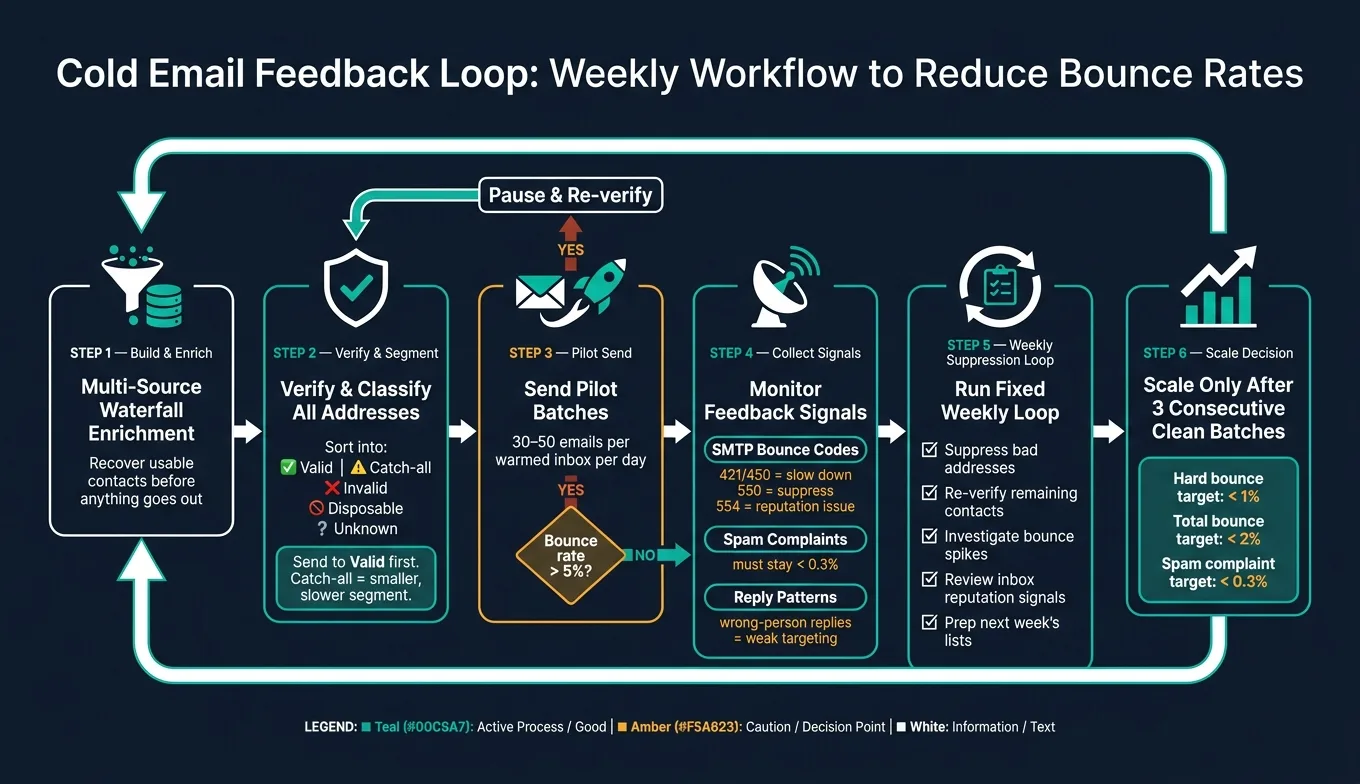
A Simple Batch-Review Workflow Teams Can Run Weekly
The way to use these feedback loops in practice is simple: make them part of a fixed weekly routine, not a once-in-a-while cleanup job. SMTP bounces, complaint signals, and verification results only matter if they shape the next sending decision.
Start with multi-source waterfall enrichment to recover more usable contacts before anything goes out. Then run verification and sort each address into these groups: Valid, Catch-all, Invalid, Disposable, and Unknown. Send to Valid addresses first. Keep Catch-all contacts in a smaller segment and move through them at a slower pace.
After that, send pilot batches of 30 to 50 emails per warmed inbox per day. If any batch goes above 5%, pause it and re-verify the rest before moving forward.
Keep one fixed weekly loop in place:
- Suppress bad addresses
- Re-verify remaining contacts
- Investigate spikes
- Review reputation signals for the affected inboxes
- Prep next week’s lists
That rhythm turns bounce data into list cleanup before the next send. Only scale after three consecutive clean batches.
Conclusion: Key Findings from the Research
The research points to a clear model: verify early, suppress fast, and review every week. Lower bounce rates come from fast feedback, not a one-time cleanup. Since B2B data changes fast, verification needs to happen before each send. Infrastructure-first platforms shorten the feedback cycle, and that faster loop helps keep bounce rates in check while protecting sender reputation.
Frequently asked questions
What SMTP bounce code indicates I should slow down my sending rate?+
SMTP codes 421 or 450 typically mean the receiving server wants you to slow down. These are temporary codes that signal throttling rather than permanent rejection. The correct response is to reduce your sending pace, not remove the address.
Why should I pause a batch when bounces exceed 5%?+
When a batch goes above 5% bounces, it signals a serious problem with either your list quality or mail setup. Pausing immediately prevents further damage to your sender reputation. You should re-verify the remaining addresses and review inbox health before continuing.
How do spam complaints differ from bounces in cold email?+
A bounce means the message couldn't be delivered to the address. A spam complaint means the recipient received your email but marked it as unwanted. Complaints are often worse for sender reputation, and major providers like Google and Yahoo require rates below 0.3%.
What does the article mean by waterfall verification?+
Waterfall verification means running email addresses through multiple verification providers in sequence to improve coverage. This approach helps recover more usable contacts before sending, since different providers may flag the same address differently.
When should I suppress a catch-all domain address?+
The article recommends keeping catch-all addresses in a separate, smaller segment and sending to them at a slower pace rather than outright suppression. Catch-all domains can look valid on the surface even when the specific mailbox doesn't exist, making them higher risk than standard valid addresses.
What does a Microsoft 550 5.7.515 error actually indicate?+
A 550 5.7.515 error from Microsoft indicates an authentication or compliance failure, not necessarily a bad email address. This means the bounce may be caused by your mail setup (SPF, DKIM, DMARC issues) rather than poor list quality, requiring you to check your technical infrastructure.
Why does the article recommend three consecutive clean batches before scaling?+
Three consecutive clean batches demonstrate consistent list quality and proper sending practices before you increase volume. This staged approach protects sender reputation by confirming your feedback loops are working and your targeting is sound before ramping up.