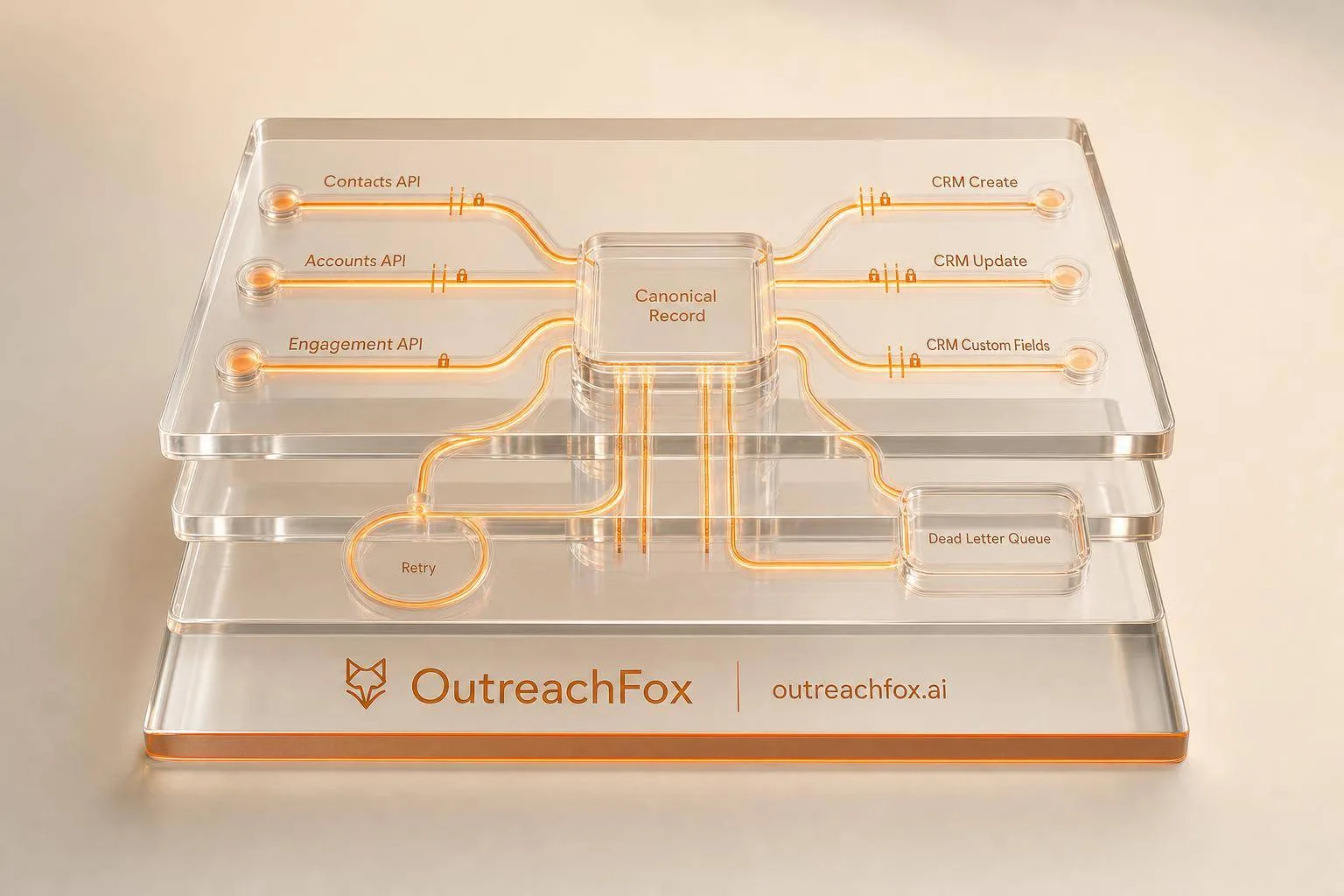
Build reliable CRM-to-outreach sync with field-level ownership, webhook verification, idempotent writes, retry logic for transient failures, and DLQ for hard failures.
- Assign field ownership before writing any sync logic to prevent conflicts
- Use CRM as enrollment trigger and outreach platform for execution
- Verify webhooks with HMAC-SHA256 and retry only 429, 408, and 5xx errors
- Send hard failures to DLQ with correlation IDs for traceable replay
- Monitor sync success rate, API quota, queue lag, and DLQ depth
- Cap Salesforce API usage from outreach sync to 20–30% of daily budget
API-Driven CRM Sync for Outbound Teams
If your CRM and outreach tool disagree, reps work from bad data. I’d set this up around one record, field-level ownership, webhook checks, idempotent writes, retries for only 429, 408, and 5xx errors, plus a DLQ when failures pile up.
Here’s the short version:
- Use one canonical record for each lead or contact
- Pick field owners first: CRM for account, owner, and pipeline data; outreach for sequence state, replies, bounces, and unsubscribes
- Sync both ways: polling for CRM changes, webhooks for outreach events
- Deduplicate by email and CRM record ID
- Ignore blank source fields so empty values don’t overwrite good data
- Verify webhooks with HMAC-SHA256 on the raw body
- Normalize inputs like phone numbers to E.164
- Retry only transient failures with backoff and jitter
- Send hard failures to a DLQ with correlation IDs for replay
- Watch alert thresholds like:
- sync success rate below 95%
- webhook failure rate above 5% in 5 minutes
- CRM API quota above 80%
- DLQ depth above 50 items
- queue lag above 15 minutes
- Cap Salesforce API use from outreach sync to about 20%–30% of your daily API budget
In plain English: I’d keep the CRM as the trigger for enrollment, let the outreach platform own sending and engagement events, and use polling plus webhooks to keep both sides in step without duplicates or drift.
That’s the setup this article walks through.
How to Sync EmailBison with HubSpot & Salesforce (Agency Workflows + CRM Attribution Webinar)
Design the Data Model and Choose the Right Architecture
Canonical Objects, Field Mapping, and Source-of-Truth Rules
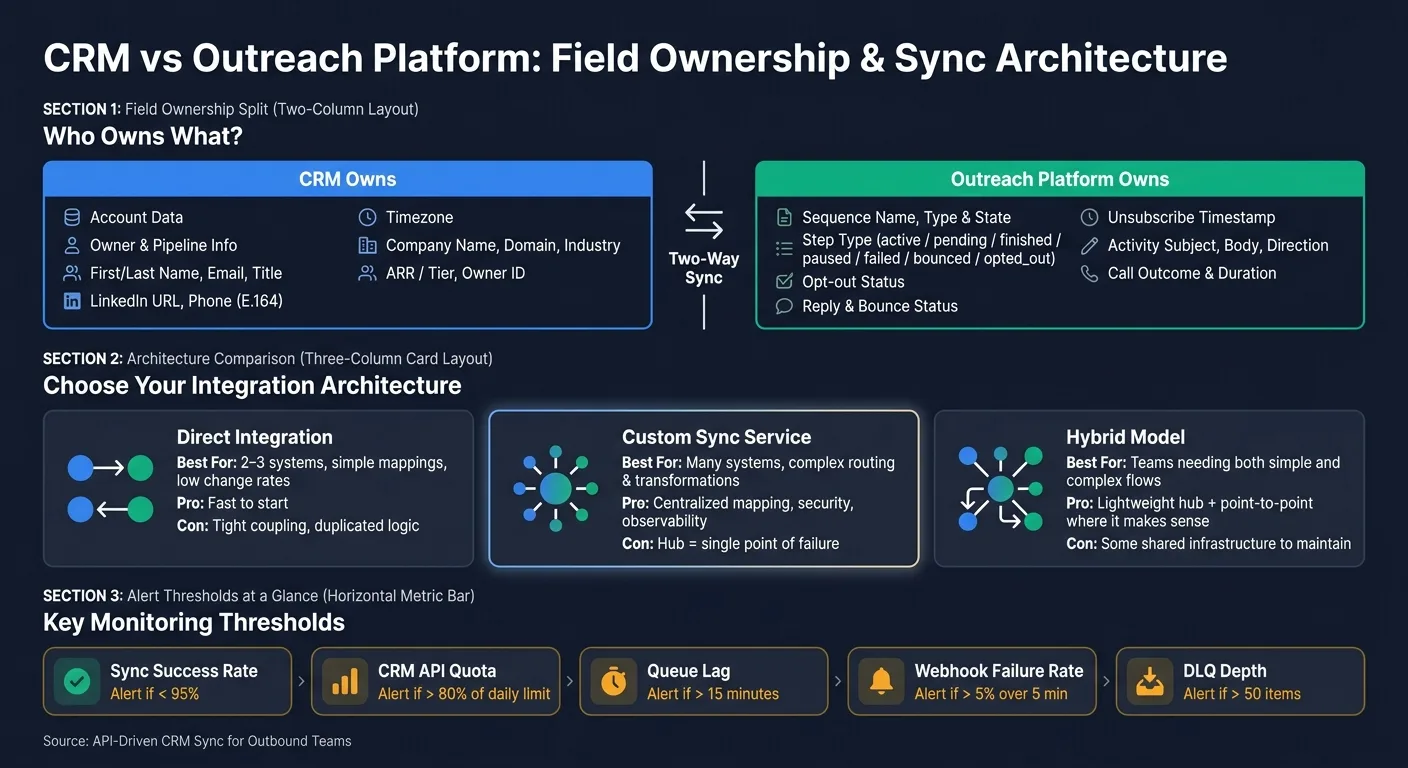
Set field ownership before you write any sync logic. If you skip this step, two systems can start fighting over the same data, and things get messy fast.
Use one canonical record for each prospect. Then assign source-of-truth rules at the field level so every system knows which values it owns.
| Object | Key Fields | Source of Truth |
|---|---|---|
| Prospects | First/Last Name, Email, Title, LinkedIn URL, Phone (E.164), Timezone, Opt-out Status | CRM: name, email, title, LinkedIn URL, phone, timezone; Outreach: opt-out, reply, bounce, sequence state |
| Accounts | Company Name, Domain, Industry, ARR/Tier, Owner ID, CRM Account ID | CRM |
| Sequences | Sequence Name, Type (Interval/Date), Ruleset ID, Step Type, State (active, pending, finished, paused, failed, bounced, opted_out) | Outreach platform |
| Activities | Subject, Body/Notes, Direction (Inbound/Outbound), Outcome, Duration, Event Timestamp | Outreach platform |
| Deliverability Events | Bounce Status, Reply Status, Unsubscribe Timestamp, Event Timestamp | Outreach platform |
For deduplication, use two main keys:
- Email address
- CRM Record ID mapped as an external ID in your outreach tool
You should also apply an ignore blank source fields rule in your sync logic. That stops an empty value in one system from wiping out a valid value in the other without anyone noticing.
Phone numbers should be normalized to E.164 format before sync. That small cleanup step saves a lot of trouble later.
Once ownership is locked in, the next move is picking an integration pattern that actually enforces those rules.
Direct Integration vs. Custom Sync Service vs. Hybrid Model
Your architecture choice should depend on three things: integration count, routing complexity, and the amount of day-to-day work your team can handle.
| Architecture | Best Fit | Benefits | Risks |
|---|---|---|---|
| Direct Integration | 2–3 systems, simple mappings, low change rates | Fast to start | Tight coupling, duplicated logic |
| Custom Sync Service | Many systems, complex routing and transformations | Centralized mapping, security, and observability | The hub becomes a single point of failure |
| Hybrid Model | Teams that need both simple and complex flows | Lightweight hub for authentication, retries, and canonical mapping; point-to-point where it makes sense | Some shared infrastructure to maintain |
A direct integration is often the fastest path when you only have a few systems and plain mappings. But there’s a catch: logic tends to get copied across connections, and changes can ripple through everything.
A custom sync service gives you one place to handle mapping, security, and observability. That’s a big plus when you have many systems and more routing logic. The tradeoff is simple: the hub can become the one thing that breaks everything else.
A hybrid model sits in the middle. It gives you a lightweight hub for authentication, retries, and canonical mapping, while still letting you keep point-to-point connections where they make sense.
Agencies working across many client workspaces have one more thing to deal with: tenant isolation. Each client’s data needs to stay separate. That means separate credentials and clear workspace-level boundaries are a must.
Next, turn those rules into API writes, webhooks, and retry logic.
Conflict Resolution, Idempotency, and Tenant Isolation
Once field ownership is set, define what happens when two systems try to write to the same field. If you don’t, the sync may look fine on paper but drift over time.
The safest default is field-level comparison with newest-timestamp precedence. In plain English, if two values compete, the newer one wins.
For high-stakes fields like "Company Name" or "Owner", don’t leave room for guesswork. Set a hard rule that the CRM always wins.
For retries, use upsert by external ID or an idempotency key. That way, if the same event gets processed twice, you still end up with exactly one record instead of two.
How to Implement Two-Way Sync with APIs and Webhooks
Once your data model is set and field ownership is clear, you can build the sync itself. There are two directions to handle:
- CRM records moving into your outreach platform
- Outreach activity moving back into the CRM
That split keeps the setup easy to reason about. The CRM decides when someone should enter the flow. The outreach platform handles the sending and activity. Then webhooks push the results back.
CRM to Outreach: Enrollment, Updates, and Owner Routing
The outbound flow begins when a CRM record meets your enrollment rules. Your sync service detects that either from a CRM webhook or from a polling job. From there, it makes two API calls: first upsert the prospect, then enroll it.
Start by upserting the prospect in your outreach platform with the CRM Record ID through POST /prospects. After that, enroll the prospect in the right sequence with POST /sequenceStates, linking that prospect to the target sequence and mailbox.
Owner routing is a big deal here. Use your CRM owner mapping to pick the right sender identity before enrollment. If you skip that step, prospects may end up under the wrong mailbox, and attribution falls apart fast. The safe move is to sync the User and User Role objects from your CRM first, then apply that mapping when enrollment happens.
Put simply: the CRM is the trigger, and the outreach platform is the execution layer.
Outreach to CRM: Replies, Bounces, Meetings, and Status Changes
After enrollment begins, webhooks close the loop by sending engagement data back into the CRM. When a reply, bounce, unsubscribe, or meeting booking happens in your outreach platform, it sends a POST request to your webhook handler. Your handler then matches the CRM record by external ID and writes the correct fields.
Before you write anything, verify the webhook with an HMAC-SHA256 signature on the raw body using constant-time comparison.
Once that check passes, the updates are pretty direct. A reply event updates Last Touch Date and Lead Status. A bounce sets Email Opt Out or a custom Bounced field. A meeting booking creates a Task or Event record in the CRM and increments a Meeting Count field.
Enrichment, Verification, and Event SLA Mapping
Run enrichment before enrollment so outbound sending starts with clean, verified data. Run it again when the record is created to verify email addresses and normalize field values in real time. Also make sure prospect stages line up with CRM lead status fields. If they don't match cleanly, add a custom CRM field for outreach stage.
Use the table below as your event-routing checklist.
| Event Type | Source System | Target System | API / Webhook | Correlation Key | Latency SLA |
|---|---|---|---|---|---|
| Lead Enrollment | CRM | Outreach | POST /sequenceStates | CRM Record ID | < 10 min (polling) |
| Email Reply | Outreach | CRM | Webhook Handler | CRM Record ID | < 1 min |
| Bounce Event | Outreach | CRM | Webhook Handler | CRM Record ID | < 1 min |
| Meeting Booked | Outreach | CRM | POST /tasks or /events | CRM Record ID | Real-time |
| Sequence Status Change | Outreach | CRM | PATCH /prospects/{id} | CRM Record ID | 30–45 sec |
| Call Logged | Outreach | CRM | POST /api/v2/calls | CRM Record ID | 30–45 sec |
| Field Update (CRM-side) | CRM | Outreach | Polling | CRM Record ID | 10 min |
One practical limit matters here. If you're syncing with Salesforce, cap your outreach platform's API usage at 20–30% of your total available Salesforce API calls. If you let it run without a cap, it can eat into capacity needed by other integrations and eventually stop syncing once the daily API limit is reached.
How to Run the Sync Reliably in Production
Staging shows that the sync can work. Production shows whether it keeps working when things go sideways. Once API writes and webhooks are live, the job shifts from setup to failure control and drift detection.
Retries, Dead-Letter Queues, and Reconciliation Jobs
Retry only transient failures:
- HTTP 429 (rate limited)
- HTTP 408 (request timeout)
- 5xx server errors
Validation errors should fail fast. If you keep retrying bad input, you just stuff the queue with junk.
When retries do happen, use exponential backoff with jitter. That spreads traffic out over time. Without jitter, retries can pile up at the same moment and turn a bad outage into a worse one.
If a record burns through all retry attempts, send it to a dead-letter queue (DLQ). Store the raw payload with the attempt count, error code, timestamp, and a correlation ID for manual or automated replay. Create that correlation ID at the entry point, then pass it through every downstream call. That way, when one record never lands in the CRM, you can trace the full path and see exactly where it failed. Set an alert when DLQ depth goes above 50 items.
Reconciliation jobs pick up the drift that webhooks miss. Run a scheduled job that compares record counts, last-updated timestamps, and missing activities across both systems. Also flag enrolled records that have no outreach activity. This is the kind of quiet drift that retries and DLQs won't always catch.
Monitoring, Logging, and Alert Thresholds
Structured logs aren't optional. Every log entry should include the system, endpoint, HTTP status, latency, object ID, and attempt number. Use the same error labels each time so operators can filter sync failures fast instead of digging through messy logs by hand.
The table below shows the metrics worth watching, why they matter, and when to step in.
| Metric | Why It Matters | Owner | Alert Threshold | Remediation |
|---|---|---|---|---|
| Sync success rate | Detects silent failures and mapping breaks | RevOps / Eng | < 95% | Check logs for 4xx/5xx errors or schema changes |
| CRM API quota consumption | Prevents sync stoppage from limit exhaustion | RevOps | > 80% of daily limit | Pause non-critical sync jobs; reduce batch sizes |
| Queue depth / lag | Measures data staleness for reps | Eng | > 15 min lag | Scale worker concurrency; check for retry storms |
| Webhook failure rate | Identifies broken real-time triggers | Eng | > 5% over 5 min | Verify endpoint health; check for schema changes |
| DLQ depth | Tracks records needing manual review | RevOps / Eng | > 50 items | Inspect payloads; fix data or update validation rules |
| Endpoint error rate (429s / 5xx) | Signals rate limiting or provider instability | Eng | > 10% error rate | Increase backoff; check provider status page |
Queues and retries tell you the flow is broken. Logs and metrics tell you where it broke.
Data Quality, Compliance, and Multi-System Scale
Reliability also depends on clean inputs and suppression parity.
Check suppression parity in every reconciliation run. Map opt-out fields both ways so a rep can't re-enroll a suppressed contact by kicking off a new CRM workflow.
Before a record enters the sync, normalize the data. Phone numbers should use E.164 format. Email strings should have whitespace removed. Ownership fields need consistent mapping, or enrollment can fail or land under the wrong owner. You also need to sync merges and deletes so deduped CRM records carry through.
For agencies or enterprise teams running multiple CRM environments - separate orgs by client, business unit, or region - use a canonical data model in the integration layer. It helps stop per-client mapping sprawl. Use server-to-server auth with scoped tenant tokens, and split sync rules by region or department so compliance boundaries stay clean.
Conclusion: How to Keep CRM and Outreach Data in Sync
A dependable CRM-to-outreach sync starts with a canonical model. That gives every sync rule one steady point of reference instead of letting each system define the data its own way.
From there, set ownership at the field level and block full-record overwrites. Update one field at a time. Never replace the entire record. That sounds like a small rule, but it prevents a lot of mess when two systems change the same contact in different ways.
Next comes the path each update takes between systems. Webhooks handle changes fast. Polling helps catch anything that slips through the cracks. Use webhooks for immediate updates, then use polling as a fallback for missed events and backfills. But that setup only works if retries, deduplication, and monitoring are part of the system from day one.
On every write, deduplicate by external ID. Use idempotent writes, backoff, and a DLQ so replay doesn’t create duplicate records by accident.
It also helps to treat the integration like production software, not a one-time setup. Watch success rate, quota use, and DLQ depth before failures hit reps. Set alert thresholds upfront. The target is simple: one current record, no duplicates, no drift. API-first platforms like OutreachFox help surface drift early with real-time webhooks and endpoint-level actions.
Frequently asked questions
Which HTTP error codes should I retry in a CRM-to-outreach sync?+
Retry only transient failures: HTTP 429 (rate limited), HTTP 408 (request timeout), and 5xx server errors. Validation errors like 4xx responses should fail fast without retries. If you keep retrying bad input, you just stuff the queue with junk and waste API quota.
How do I prevent duplicate records when syncing between CRM and outreach platforms?+
Deduplicate by two main keys: email address and CRM Record ID mapped as an external ID in your outreach tool. Use idempotent writes via upsert by external ID or an idempotency key so if the same event gets processed twice, you still end up with exactly one record instead of two.
What percentage of Salesforce API calls should I budget for outreach sync?+
Cap your outreach platform's API usage at 20–30% of your total available Salesforce API calls. If you let it run without a cap, it can eat into capacity needed by other integrations and eventually stop syncing once the daily API limit is reached.
How do I verify webhook authenticity from my outreach platform?+
Verify webhooks with HMAC-SHA256 signature on the raw body using constant-time comparison before processing any payload. This prevents malicious actors from sending fake events to your webhook handler that could corrupt CRM data or trigger unwanted actions.
What alert thresholds should I set for production sync monitoring?+
Key thresholds include: sync success rate below 95%, webhook failure rate above 5% in 5 minutes, CRM API quota above 80%, DLQ depth above 50 items, and queue lag above 15 minutes. These metrics catch failures before they impact reps working from stale data.
Why should I ignore blank source fields during sync?+
An empty value in one system can wipe out a valid value in the other without anyone noticing. The ignore blank source fields rule prevents this silent data loss by only syncing fields that actually contain data, preserving existing good values.
What should go into a dead-letter queue entry for failed sync records?+
Store the raw payload with attempt count, error code, timestamp, and a correlation ID for manual or automated replay. Create the correlation ID at the entry point and pass it through every downstream call so you can trace the full path when a record fails to land.