
Mail with aligned SPF, DKIM, and DMARC reaches inboxes 78-85% of the time, while unauthenticated mail lands there only 8-22%. Poor setup can hurt deliverability more than no setup at all.
- SPF alone is insufficient; DKIM and DMARC alignment are critical for deliverability
- Authenticated mail reaches inboxes 78-85% versus 8-22% for unauthenticated mail
- SPF has a 10-DNS-lookup limit that often breaks with tool sprawl
- Use 2048-bit DKIM keys and ensure alignment with your From domain
- Roll out DMARC gradually: monitor with p=none before enforcing p=reject
- Map all active senders before moving to DMARC enforcement policies
SPF, DKIM, DMARC: Impact on Deliverability
If your email setup fails SPF, DKIM, or DMARC, a lot of your outbound mail may never hit the inbox. In the data shared here, mail with all three set up and aligned reached the inbox about 78%–85% of the time, while mail with no setup landed there only 8%–22% of the time.
Here’s the short version: SPF checks who can send, DKIM checks whether the message stayed the same, and DMARC checks whether those checks match your visible From domain. If one part is off, you can get spam placement, silent failures, or dropped mail even when your outreach tool shows no clear issue.
If I had to boil the article down, I’d say this:
- SPF alone is not enough
- DKIM helps when forwarding breaks SPF
- DMARC matters most when alignment is clean
- Bad setup can hurt more than no setup
- The safest order is SPF, then DKIM, then DMARC
- A slow rollout beats jumping straight to
p=reject
A quick side-by-side view:
| Protocol | What it does | Main thing to watch |
|---|---|---|
| SPF | Lists approved sending servers | 10 DNS lookup limit |
| DKIM | Adds a signature to the message | Use 2048-bit keys and keep alignment clean |
| DMARC | Applies policy and checks alignment | Don’t enforce before you map all senders |
My main takeaway: setup quality drives a big part of deliverability. You don’t need more tools first. You need clean records, aligned domains, and a rollout that doesn’t block mail you still send.
Email Authentication Explained for Better Deliverability (SPF, DKIM, DMARC)
What Research Shows About Authentication and Inbox Placement
Why Authenticated Mail Gets More Trust From Receivers
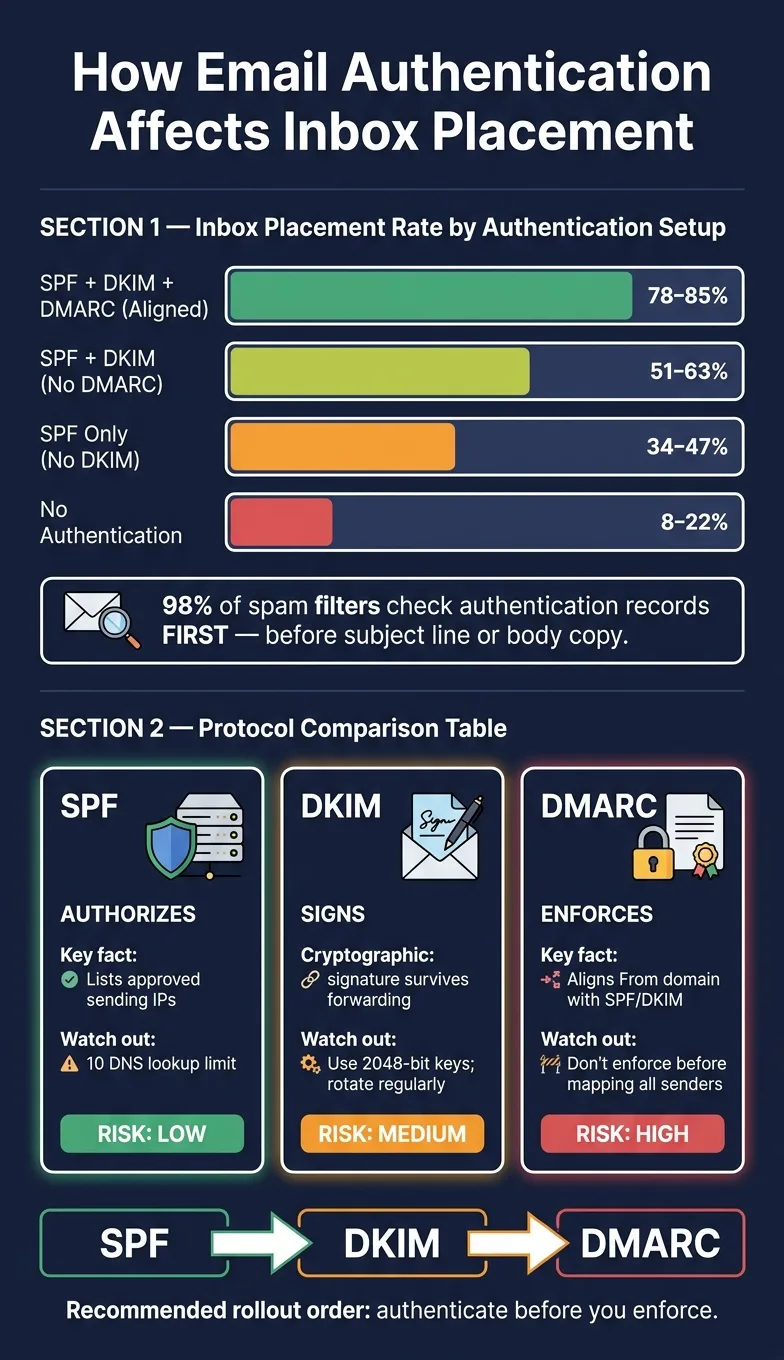
The pattern is plain. Domains with fully aligned SPF, DKIM, and DMARC see average inbox placement rates of 78–85%. Domains with no authentication at all make it to the inbox only 8–22% of the time. That gap can decide whether a campaign gets seen or disappears into spam.
The biggest reason is simple: 98% of spam filters check authentication records first. They do this before subject line, body copy, or links get much weight. If the message passes, mailbox providers can then look at reputation and engagement signals. If it fails, the message often goes to spam quietly, with no bounce and no clear alert.
And that edge only holds when authentication is set up the right way in live sending, not just added in theory.
How DKIM and DMARC Add Resilience Beyond SPF Alone
SPF has a weak spot: forwarding. Security tools and auto-forwarders often swap out the original sending IP, which causes SPF validation to fail. DKIM works differently. Its cryptographic signature stays with the message headers, so it can survive routing changes.
You can see that pattern in inbox placement data:
| Authentication Setup | Avg. Inbox Placement Rate |
|---|---|
| SPF + DKIM + DMARC aligned | 78–85% |
| SPF + DKIM, DMARC missing | 51–63% |
| SPF only, no DKIM | 34–47% |
| None configured | 8–22% |
DMARC adds one more check on top of SPF and DKIM. It confirms that the visible From domain matches the domain used during authentication.
The next section breaks down where those failures show up in actual outbound setups.
How Misconfiguration Can Lower Deliverability
Poor setup can be worse than having nothing in place. Broken DKIM signatures or SPF records that go past the 10-DNS-lookup limit can cause silent failures. The receiving server may accept the message, then send it to spam later. No bounce. No error. No clear warning in most outreach dashboards.
DMARC can create the same kind of trouble if enforcement starts too early. Moving to p=reject before the setup is clean means valid outbound mail can get dropped when legitimate sending sources are still missing from SPF.
At the same time, staying on p=none forever has a cost too. Microsoft and Yahoo are putting more weight on that signal, and a permanent p=none policy can slowly hurt trust in the domain.
In outbound systems, these problems usually trace back to three places: SPF, DKIM, and DMARC rollout.
Where Deliverability Breaks in Real Outbound Setups
SPF Lookup Limits, Missing Senders, and Forwarding Problems
In outbound setups, authentication problems usually don't show up as a clean bounce. They tend to appear as lower inbox placement instead, which makes them easy to miss.
SPF has a hard limit of 10 DNS lookups per check. Each include, a, mx, and exists lookup counts, including nested third-party lookups. Go past that limit and the receiver returns PermError. The annoying part? Many tools don't show the root cause. They just show the result: more mail landing in spam.
Audits of manually configured SPF records in 2026 found that about 1 in 8 had lookup count problems. In most cases, the cause was simple tool sprawl. A team adds a CRM, then a sequencing platform, then a few more senders over time, and nobody keeps track of the total. In outbound systems, that usually means worse inbox placement, not a direct bounce that forces someone to look closer.
Forwarding makes things messier. If a security gateway or auto-forwarder relays a message, SPF fails because the original sending IP is no longer visible. DKIM handles this much better because the signature stays with the message headers as the email moves along.
DKIM Signing Failures and Alignment Mismatches
A lot of sequencing tools sign outbound email with the provider's domain by default. That means the d= value points to the provider, not the sender's domain.
So yes, DKIM can pass on its own. But DMARC alignment still fails.
That's the part people often miss. The problem isn't just whether a signature exists. It's whether that signature lines up with the domain you're sending from.
There's another issue here too. 1024-bit DKIM keys now carry a trust signal penalty with Google and Yahoo. In 2026, 2048-bit keys are the minimum. And if keys have never been rotated, that can weaken trust as well, even when no clear error appears in the dashboard.
DMARC Policies Enforced Before Reporting Is Clean
The most common self-inflicted DMARC problem in outbound setups comes from hidden senders.
These are usually things like:
- CRM notifications
- Helpdesk tools
- Automated alerts
- Legacy marketing platforms
They still send under the primary domain, often without anyone noticing. Then enforcement gets moved to p=quarantine or p=reject, and those sources start failing DMARC. Their mail gets quarantined or dropped, and most outreach dashboards never give a clear warning.
That’s why clean reporting matters before enforcement. If you lock down DMARC before you know every sender using the domain, you're flying blind.
The next section separates what SPF, DKIM, and DMARC each do so these failures are easier to diagnose.
SPF vs. DKIM vs. DMARC: What Each Protocol Actually Does
Each protocol handles a different part of email authentication. That’s why the rollout order matters: SPF first, DKIM second, DMARC last.
Side-by-Side Protocol Comparison for Outbound Teams
| Protocol | Primary Purpose | Deliverability Effect | Main Failure | Risk |
|---|---|---|---|---|
| SPF | Authorizes sending hosts/IPs | Baseline trust signal; helps prevent server spoofing | Exceeding the 10-DNS-lookup limit (PermError) | Low |
| DKIM | Signs message content | Strong trust signal; proves integrity | Weak 1024-bit keys or forwarding breakage | Medium |
| DMARC | Governs alignment and policy | Strongest trust signal; prevents spoofing | Domain misalignment with the From header | High |
Here’s the simple split: SPF authorizes, DKIM signs, and DMARC enforces alignment.
For outbound teams, the practical sequence is just as simple. Start with authorization, move to message integrity, then turn on enforcement. If you flip that order, things can get messy fast.
How DMARC Policy Levels Affect Rollout Risk
DMARC has three rollout stages: p=none for monitoring, p=quarantine for partial enforcement, and p=reject for full enforcement. It’s also the only record here that can block legitimate mail, which is why rollout order matters so much.
| Policy | Enforcement Strength | Risk | Right Stage for Cold Outbound |
|---|---|---|---|
| p=none | None (monitoring only) | Zero | Use until all active senders are identified |
| p=quarantine | Medium - failed mail goes to spam | Moderate | Use once your legitimate sources are mapped and alignment is mostly clean |
| p=reject | High - failed mail is blocked entirely | High | Use only after alignment is clean across all known sources |
The jump from p=quarantine to p=reject is where teams often get burned. Mail that looks fine on the surface can still fail if a hidden sender is active in a CRM, helpdesk, or alert tool that sends under the main domain.
A safer move is to test enforcement gradually with pct=. For example, pct=10 applies enforcement to 10% of failing mail during rollout. That gives you room to spot issues before they hit every message.
That sequence leads directly into the staged rollout pattern in the next section.
A Rollout Pattern Backed by the Evidence
A Staged Rollout for Agencies and Sales Teams
The rollout path is simple: audit first, authenticate second, enforce last. Teams usually get into trouble when they skip steps or move to enforcement too fast.
The main issue isn’t whether to enforce DMARC. It’s how to go from monitoring to enforcement without blocking mail you still need.
| Rollout Phase | Policy Level | Duration | Primary Goal |
|---|---|---|---|
| 1. Audit | N/A | 1 week | Map all active senders |
| 2. Monitor | p=none | 2–4 weeks | Collect aggregate DMARC reports |
| 3. Soft Enforcement | p=quarantine | 2–4 weeks | Test failure handling |
| 4. Full Enforcement | p=reject | Ongoing | Block unauthorized mail |
| 5. Optimization | p=reject | Ongoing | Maintain alignment |
Once alignment is clean, increase enforcement in small steps and check each update as you go. That matters even more when you manage many domains at once. Automated DNS management helps cut manual mistakes.
One thing makes this sequence work: you need a complete view of every active sender before enforcement starts. If one sending source is missing, it can come back to bite you later.
Key Takeaways for Better Deliverability
Alignment and enforcement tend to drive the best deliverability gains when the sender map is complete. One of the biggest misses for many teams is configuration quality. It sounds boring, but it often decides whether rollout goes smoothly or turns into a mess.
DKIM rotation and sender audits also need to stay in the mix after enforcement. Otherwise, setups drift over time, and small issues can turn into larger mail problems.
Frequently asked questions
Why does authenticated mail with SPF, DKIM, and DMARC aligned achieve 78-85% inbox placement while mail with no authentication only reaches 8-22%?+
98% of spam filters check authentication records first, before analyzing subject lines, body content, or links. When authentication passes, mailbox providers can then evaluate reputation and engagement signals. When it fails, messages often go to spam silently without bounces or clear alerts, which is why the gap in inbox placement is so large.
What happens when an SPF record exceeds the 10 DNS lookup limit?+
When SPF exceeds the 10 DNS lookup limit, the receiving server returns a PermError. This typically doesn't show up as a clear bounce—instead, more mail lands in spam without obvious warnings in most outreach dashboards. Audits in 2026 found that about 1 in 8 manually configured SPF records had lookup count problems, usually caused by adding multiple tools over time without tracking the total.
Why does DKIM work better than SPF when emails are forwarded?+
SPF fails during forwarding because security gateways and auto-forwarders change the original sending IP, breaking SPF validation. DKIM uses a cryptographic signature that stays attached to the message headers, so it survives routing changes and can still pass validation even after the email has been forwarded.
Can DKIM pass but DMARC still fail, and how does this happen in outbound setups?+
Yes, DKIM can pass while DMARC fails due to alignment mismatches. Many sequencing tools sign outbound email with the provider's domain by default (in the d= value) rather than the sender's domain. While the DKIM signature itself passes, DMARC alignment fails because the signature domain doesn't match the From domain.
What are hidden senders and why do they cause DMARC enforcement problems?+
Hidden senders are tools like CRM notifications, helpdesk systems, automated alerts, or legacy marketing platforms that still send email under the primary domain without the team's awareness. When DMARC enforcement moves to p=quarantine or p=reject before these sources are identified, their mail gets quarantined or dropped, often without clear warnings in outreach dashboards.
Why should teams use p=quarantine before moving to p=reject in DMARC?+
Moving directly to p=reject can block legitimate mail from hidden or unmapped senders. Using p=quarantine as an intermediate step allows teams to test failure handling with moderate enforcement (failed mail goes to spam rather than being blocked entirely) before applying full enforcement. Teams can also use the pct= parameter to apply enforcement gradually, such as pct=10 for 10% of failing mail.
Why do 1024-bit DKIM keys hurt deliverability in 2026?+
1024-bit DKIM keys now carry a trust signal penalty with Google and Yahoo, as they're considered too weak for current security standards. The minimum requirement in 2026 is 2048-bit keys. Using outdated key lengths can weaken domain trust even when no clear errors appear in sending dashboards.